
Participating Frequently
May 19, 2023
Answered

Quick change missing font without notification dialog?

  • May 19, 2023
  • 1 reply
  • 709 views

Hello everyone! I'm having some trouble with "Manage missing fonts" after updating photoshop. I tried looking for this error but didn't see the answer anywhere:
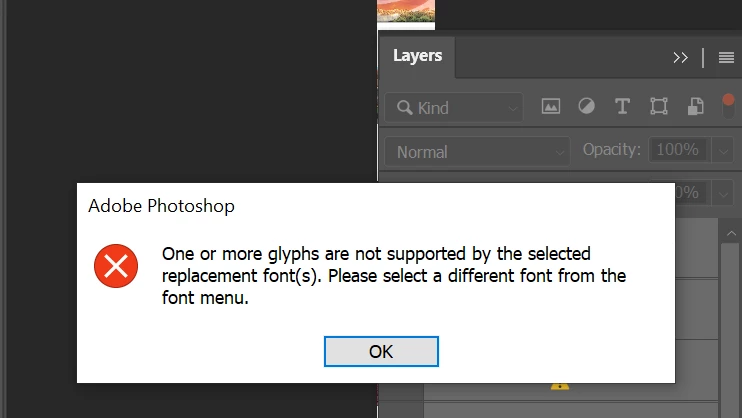
 

However I just need a way to quickly change missing fonts into another one, so if there's any script for this problem please let me know. I sincerely thank you!

This topic has been closed for replies.
Correct answer Kevin Stohlmeyer

Hi @Gordon Cohen5285689037vro unfortunately when working with extended character fonts like the ones you mentioned you're going to have to research to find replacement fonts that can support the characters you originally used.

Again - the error is the font you are choosing as the replacement does not contain the entire character base your original font had so it cannot render certain characters so it's erroring out.

1 reply

Kevin Stohlmeyer
Community Expert
Community Expert
May 19, 2023

hi @Gordon Cohen5285689037vro the answer is in the error message - the missing font you are trying to replace is using extended glyphs that the font you are choosing does not have/support. What font is missing and which one are you attempting to replace with?

Participating Frequently
May 20, 2023

Hi @Kevin Stohlmeyer, thank you for your reply!

I usually work with a lot of different fonts, they are not always the same and are not defined, so I cannot mention each ones. Most are usually Korean, Chinese, Japanese characters and are paid fonts. But I just need to change all of them into one.
With the latest photoshop, I can use handly input of the font to be converted to without creating any error or message (here is the video) - I'd love if it worked same as Action.

But when using "Manage missing font", it has the error like above. So I can't figure out what the error is.


Stephen Marsh
Community Expert
Community Expert
May 20, 2023

@Gordon Cohen5285689037vro 


I believe what @Kevin Stohlmeyer is saying is that you need to replace like for like. If the source font uses specific glyphs then the replacement font must have the same glyphs available.