tinc2154814
Participant
December 17, 2020
Answered

Quick Mask Mode Button Missing From Toolbox

  • December 17, 2020
  • 1 reply
  • 2716 views

Hello all,


I'm trying to figure out why the Quick Mask button is no longer in my toolbox.  Not sure if it's a bug or whether Adobe decided to remove it.


Currently using version 20.0.8 on the Mac.


Thanks for any help on this,

TC

This topic has been closed for replies.
Correct answer Chuck Uebele

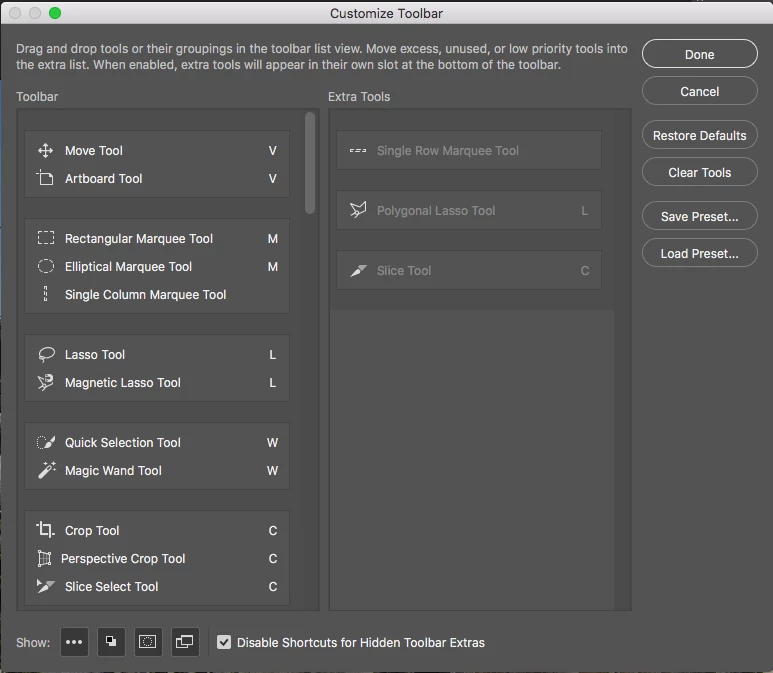
Select edit>toolbar and make sure that the quick mask icon is enabled in the preferences. It's in the lower left corner.
1 reply

Chuck Uebele
Community Expert
Chuck UebeleCommunity ExpertCorrect answer
Community Expert
December 17, 2020

Select edit>toolbar and make sure that the quick mask icon is enabled in the preferences. It's in the lower left corner.

tinc2154814
Participant
December 17, 2020

Thank you Chuck for the solution.  Much appreciated!
