You've answered your own question. Ctrl (Cmd) i inverts the selection when you are in Quick Mask mode. I think a lot of people miss the fact that most tools and functions still work when in Quick Mask, but work to modify what is selected. You can use blur on the mask to feather the selection. You can use the Marquee tools to add and subtract from the selection. Use the Burn tool to make a soft edge hard, etc. etc. When you get the way Quick mask works into your head you can see how powerful it actually is.
I like it because it is so powerful, but also because you can flick in and out of it so quickly, and that it gives you a far better 'visual' representation of what is selected than the marching ants. The marching ants just show you what is 50% or more of what is selected. So if your selection is 45% opaque you'd see no marching ants at all, but Quick Mask would show as a light pink (or whatever colour you have selected.
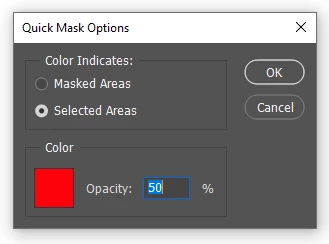
Note: To avoid confusion, I always have Quick Mask set to show 'selected' areas and not the defualt 'masked' areas. You can change that by double clicking the Quick Mask icon at the bottom of the Toolbar.


 AdChoices