Rena Violet
Participant
July 8, 2017
Question

Quick question about masking text!

  • July 8, 2017
  • 3 replies
  • 203 views

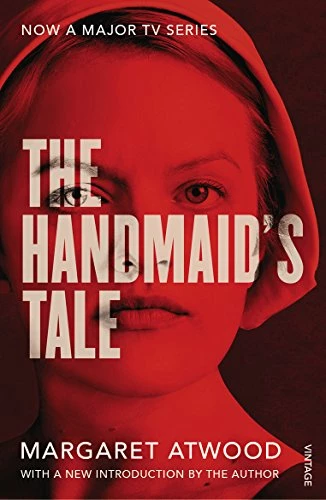
hi guys! I'm wondering what tools/steps/blending is used to make this happen? the imge is overlayed with color and the text is not. Im sure its super easy but i nee help!

[Moved out of the general, all-of-Adobe forum Lounge and into a Photoshop-specific support forum by a moderator]

This topic has been closed for replies.

3 replies

Trevor.Dennis
Community Expert
Community Expert
July 9, 2017

The trick here is to not have the red showing through the lowered opacity text.  Blend modes won't work for you here, so I placed a Hue Saturation layer above the background image set to Colorize (for the red tint).  Then added the text layer and set its opacity to 30% (whatever works for you).  I ten Ctrl clicked the text layer to load it as a selection, and filled the Hue/Sat's mask with black.

At this point I decided that the text worked better against lighter non-coloured backgrounds, so I threw in a B&W adjustment layer, after which I could drop the text opacity to 10%.  You see what I mean?  Sometimes you have to experiment to get what you are after.

davescm
Community Expert
Community Expert
July 9, 2017

Hi

I like Trevor's method but I was not keen on having the text in a separate mask which would need to be updated each time the text is edited.

So I did this:

1. I added a gradient map to the color image to get the red black effect.

2. I clipped a black and white adjustment layer to the text and set the blending mode to Liner Dodge (Add) . I also set the blending options of the black and white adjustment to "Knockout =Deep" and the Text layer I unchecked Blend Clipped layers as a group

B&W Adjustment layer:

Text Layer:

3. Finally I added a second B&W layer again clipped to the layer below and with a tint set

This way -the text can be edited without changing the masking

Dave

Nancy OShea
Community Expert
Community Expert
July 8, 2017

I love that book!

Anyway, I am assuming you're using Photoshop, right?

You want the Horizontal Type Mask Tool.  It creates type-shaped selections on your background layer.

Nancy O'Shea— Product User & Community Expert
John T Smith
Community Expert
Community Expert
July 8, 2017

The Lounge Forum is not for technical help, please provide the name of the program you are using so your message may be moved to the correct program forum... A program would be Photoshop or Premiere Pro or ???