


wayneh92496952
Known Participant
August 22, 2017
Answered

Quick Selection tool not behaving itself in Photoshop CC 2017

  • August 22, 2017
  • 2 replies
  • 10022 views

I have been trying to replace boring skies with a layer of clouds, etc.

The background layer is of plain but bright blue sky. There is a horizon that is sharp and multicolored. There is a clear color distinction between the blue sky and the horizon.

Yet the quick selection tool is not able to be dragged along that well demarcated horizon. It jumps into the city and will not "find" the pixel border between the different  elements.

Other than resetting my tools is there something else going on?

The two images are jpeg.

Thanks
    This topic has been closed for replies.
    Correct answer teachbit

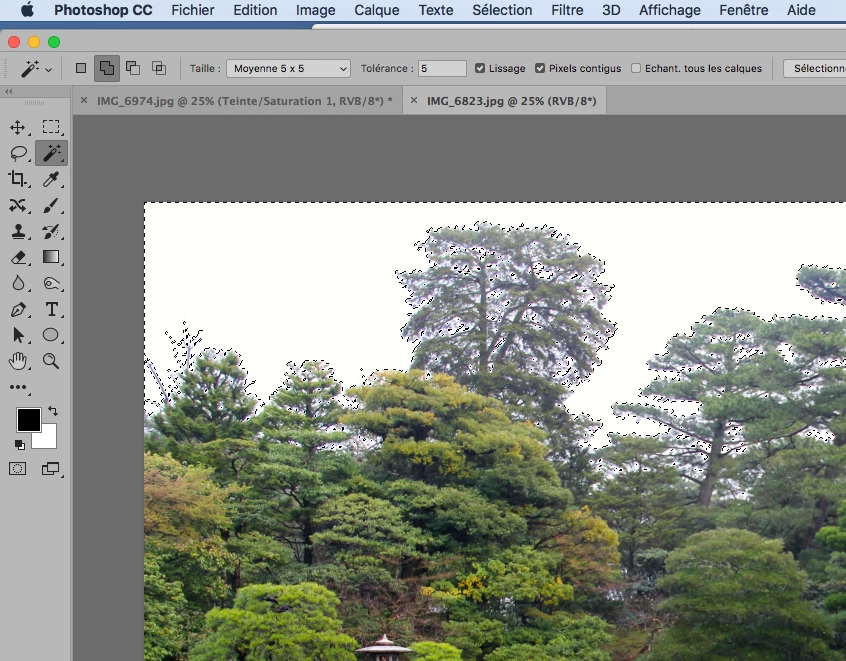
    instead of the Quick Selection tool, you could use the magic wand tool, click on the sky and to eventually add parts of the sky between trees or buildings use the command Select/ general. If you want I can send you the screenshot with the english version of Photoshop.

    2 replies

    PECourtejoie
    Community Expert
    Community Expert
    August 22, 2017

    Hello, remember step one of troubleshooting: reset the tool.

    To do so, right-click the tool icon in the option bar (the one below the menus) and select reset tool.

    c.pfaffenbichler
    Community Expert
    Community Expert
    August 22, 2017

    Please post a screenshot including all pertinent Panels.

    Yet the quick selection tool is not able to be dragged along that well demarcated horizon.

    Did you stick in the sky-region or cross the border?

    teachbitCorrect answer
    Participating Frequently
    August 22, 2017

    instead of the Quick Selection tool, you could use the magic wand tool, click on the sky and to eventually add parts of the sky between trees or buildings use the command Select/ general. If you want I can send you the screenshot with the english version of Photoshop.