Known Participant
December 30, 2024
Answered

Quickly Compare Alternate Adjustment Layers?

  • December 30, 2024
  • 3 replies
  • 719 views

I often have two adjustment layers that I'd like to compare, in order to select the best one (and delete the other).


I can of course turn one off by clicking the eyeball icon in the layers palette, then turning the other on by clicking its eyeball icon. But that makes it impossible to see a quick A/B comparison.


Is there a trick to instantly switch visibility back and forth between the two layers?


Thanks for any help!

Correct answer Conrad_C

Is there any reason layer comps won’t work for this? This is one of the big reasons it’s a Photoshop feature. With Layer Comps, you can A/B test not just two different adjustment layers, but any visibility combination of any number of layers. And you can make more layer comps of other layer combos, so that you can do A/B/C/D/E… testing.


The basic idea is that you enable any set of layers, then create a layer comp of that. Then you enable any other combination of layers, and create a layer comp of that. Finally, you can click between the layer comps to enable each saved combination of layer visibility. Optionally, a layer comp can also remember the position, appearance, etc. of its visible layers.
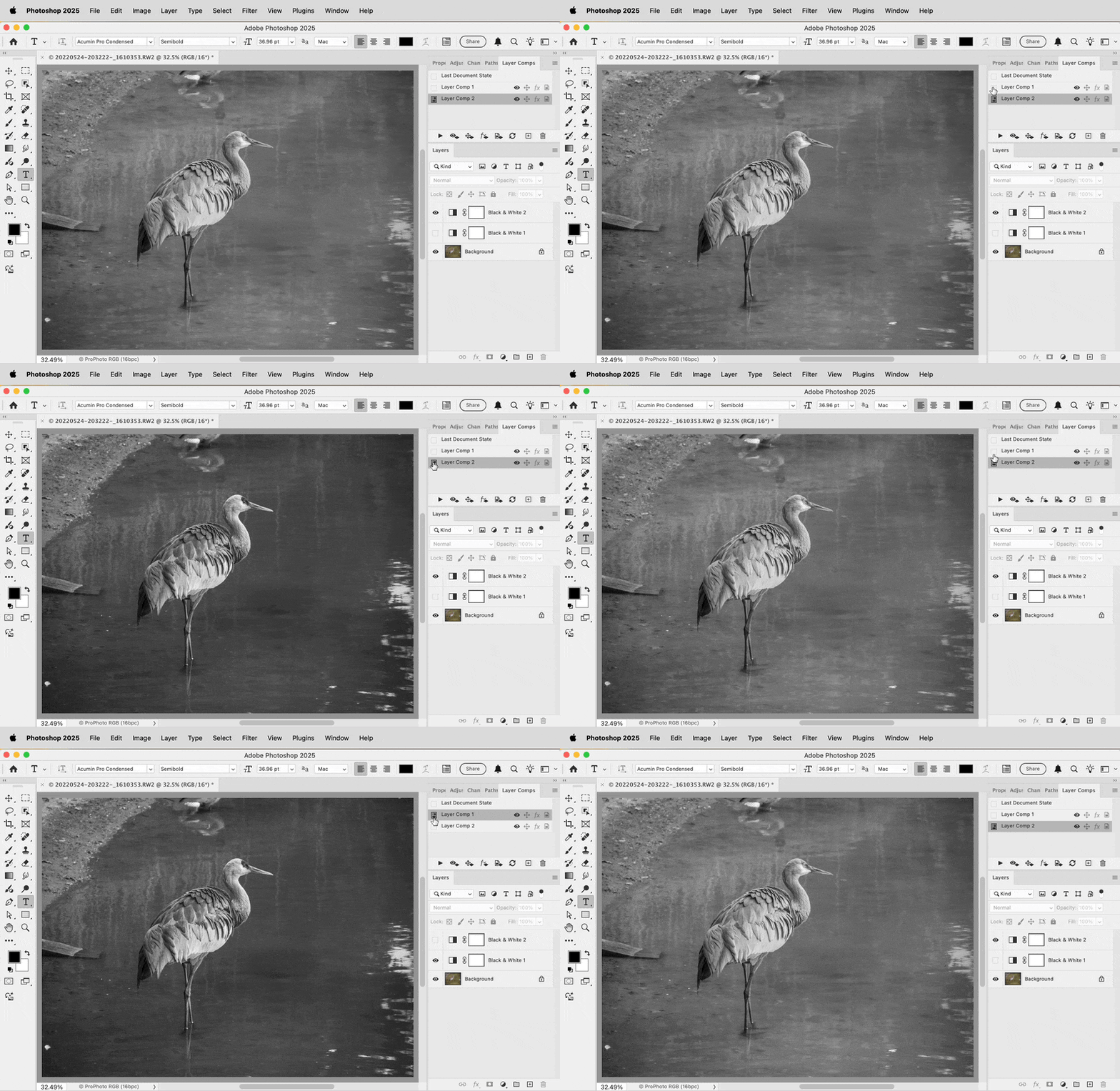


I also like the History snapshots idea suggested earlier, because they might be quicker and easier to set up for this purpose if you don’t need to save them with the document, since your goal is to delete one of the layers. Layer Comps are saved with a document, in case you want them to be there in the future.

3 replies

NB, colourmanagement
Community Expert
Community Expert
January 5, 2025

@krinkly2009 if its not tedious, I'd simply duplicate the document and set one to each option 


neil barstow - adobe forum volunteer,

colourmanagement consultant & co-author of 'getting colour right'

See my free articles on colour management

Help others by clicking "Correct Answer" if the question is answered.

Found the answer elsewhere? Share it here. "Upvote" is for useful posts


Known Participant
January 5, 2025

Another good idea -- but my photosohp files are often huge, so that may indeed be more time-consuming than it's worth.

Thanks!

Conrad_C
Community Expert
Conrad_CCommunity ExpertCorrect answer
Community Expert
December 31, 2024

Is there any reason layer comps won’t work for this? This is one of the big reasons it’s a Photoshop feature. With Layer Comps, you can A/B test not just two different adjustment layers, but any visibility combination of any number of layers. And you can make more layer comps of other layer combos, so that you can do A/B/C/D/E… testing.


The basic idea is that you enable any set of layers, then create a layer comp of that. Then you enable any other combination of layers, and create a layer comp of that. Finally, you can click between the layer comps to enable each saved combination of layer visibility. Optionally, a layer comp can also remember the position, appearance, etc. of its visible layers.


I also like the History snapshots idea suggested earlier, because they might be quicker and easier to set up for this purpose if you don’t need to save them with the document, since your goal is to delete one of the layers. Layer Comps are saved with a document, in case you want them to be there in the future.

Known Participant
January 1, 2025

This works great! It does take a bit more setup, but it's straight forward once I've got multiple adjustment layers all ready to compare.


Thanks!

Stephen Marsh
Community Expert
Community Expert
December 30, 2024

I'd ceate an action or script, or use history snapshots.

Known Participant
December 30, 2024

History snapshots is a great thought. I'll give it a try.