Participant
May 8, 2019
Answered

Radial filter?

  • May 8, 2019
  • 2 replies
  • 818 views

I'm trying to work with radial filters in Photoshop. Here are the steps I am taking.

- I open a file in Photoshop

- Click on 'Filter', then 'Camera Raw Filter"

- Click on 'Radial Filter' at the top

- What happens is a box opens in the middle of the photo. I can move around the box but I cannot move around any filter area.

How do I create a filter that I can make adjustments inside or out?

Thank you in advance!
This topic has been closed for replies.
Correct answer

Hi

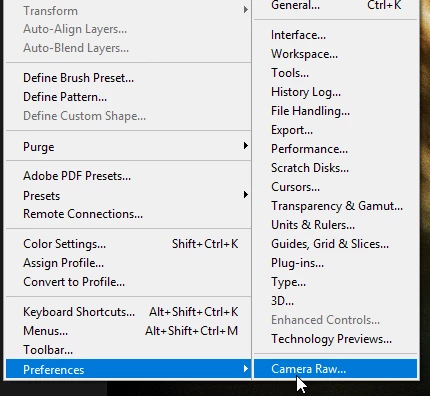
Try resetting Camera Raw references

How To: Reset Camera Raw Preferences - YouTube

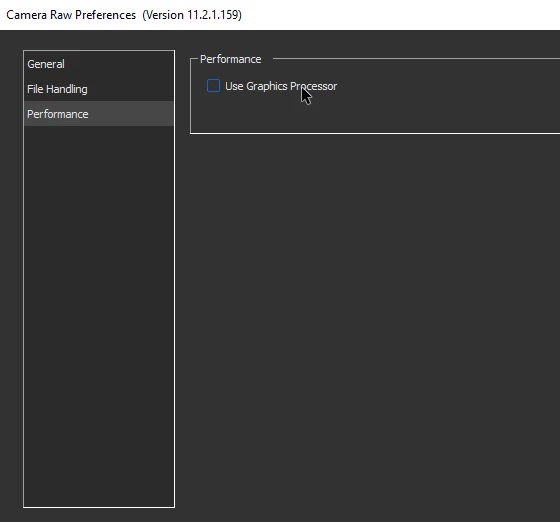
If that doesn't help in Photoshop go to Edit and disable "Use Graphics Processor" then restart Photoshop

2 replies

JJMack
Community Expert
Community Expert
May 8, 2019

Did you first convert the Layer or layers to a smart object layer so the camer raw filter would be a smart flter. Or are you working is a destructive way with camera raw filter. Do you drag the control circle to move the filter.   Click New to add Addition radial filters.  In Edit mode you should be able to move, shape, size, rotat and delete radial filters.

In Brush mode you should be able to brush anywhere

JJMack
May 8, 2019

Hi

Drag the handles to alter the size and if you scroll down you'll see to option for Outside or Inside

Participant
May 8, 2019

If I double click I can see a radial filter....but I cannot grab and/or drag the handles.

I see a square box...but I do not see what it is doing.

Correct answer
May 8, 2019

Hi

Try resetting Camera Raw references

How To: Reset Camera Raw Preferences - YouTube

If that doesn't help in Photoshop go to Edit and disable "Use Graphics Processor" then restart Photoshop