Participant
June 2, 2023
Question

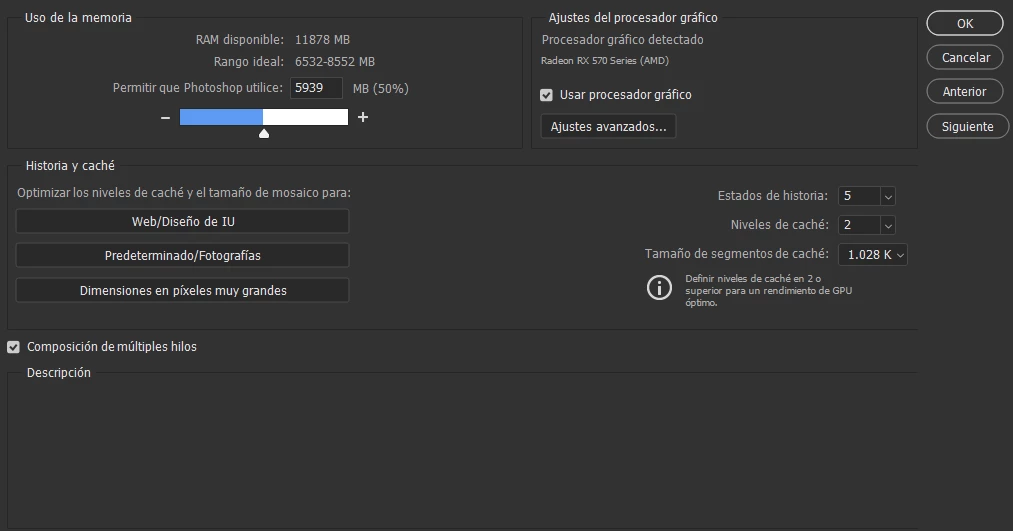
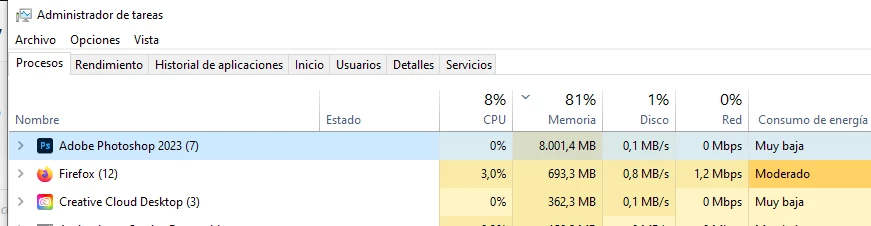
RAM ISSUE photoshop IGNORING memory allocation set by me

  • June 2, 2023
  • 3 replies
  • 301 views

i need HELP asap

this is happening and is so annoying and not to say so wrong.

i dont know what else to do
 

This topic has been closed for replies.

3 replies

D Fosse
Community Expert
Community Expert
June 2, 2023

That's a fair-sized file, but not very big, I get bigger out of my camera. That shouldn't be the problem.


Is this by any chance a laptop with an integrated graphics processor? (Not familiar with AMD). An integrated GPU will eat into system memory, but I must confess I'm not sure where that memory usage would be listed.


What happens if you increase slightly so that you get into the "recommended" range?


juaniwdqAuthor
Participant
June 2, 2023

it was just windows edge view

i have not installed anything else but clean photoshop and lightroom literally i installed it yesterday from scratch like, im still in my 7 days trial...

i have read almost all the posts from this issue and none of them solves mine..

i have to mention the project that i was working on last night was heavy and large in pixels (5400x7200) i dont know why those specific pixels i just picked the "poster" size template when i started

D Fosse
Community Expert
Community Expert
June 2, 2023

There are 7 sub-processes under Photoshop - can you expand so we see what they are?


I don't really have an explanation for this, it shouldn't go over the allocation. It could be plugins, including ACR. Plugins run outside the host application's address space, and use additional memory.