Participant
November 8, 2009
Question

RASTERIZE remains greyed out

  • November 8, 2009
  • 3 replies
  • 98335 views

I am fairly new with Photoshop (CS3 Extended) so please bear with me.

I have a file with a layer that I want to rasterize.
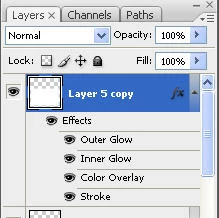
When I right click on the layer the rasterize option is greyed out and also if I select Layer and Rasterize.

If I merge down with the previous layer or insert an empty layer underneath it remains greyed out and unavailable.

Any suggestions?

Thanks

    This topic has been closed for replies.

    3 replies

    GfWOneAuthor
    Participant
    November 8, 2009

    Thank you gentlemen ... I think.

    I was trying to follow a tutorial and I think that I was following correctly when I can to the rasterize part.

    The tutorial is here if you want to check it out ... http://www.grafpedia.com/tutorials/web-20-photoshop-layout-tutorial

    Thanks

    November 8, 2009

    That is the weirdest tutorial I ever saw!


    The fact remains that, if a layer consists solely of pixels (ie no vectors), there is nothing to rasterise and the menu item will be greyed out.

    Mylenium
    Legend
    November 8, 2009

    As John said, there is nothing to rasterize. Pixels are pixels. At most you could convert the layer styles to individual layers, but that's it. There is no specific option to flatten them into the currently active layer, so merging with a blank layer is the only way to do that.

    Mylenium

    November 8, 2009

    There's probably nothing there to rasterize!


    What's on the layer?