Participant
January 5, 2024
Question

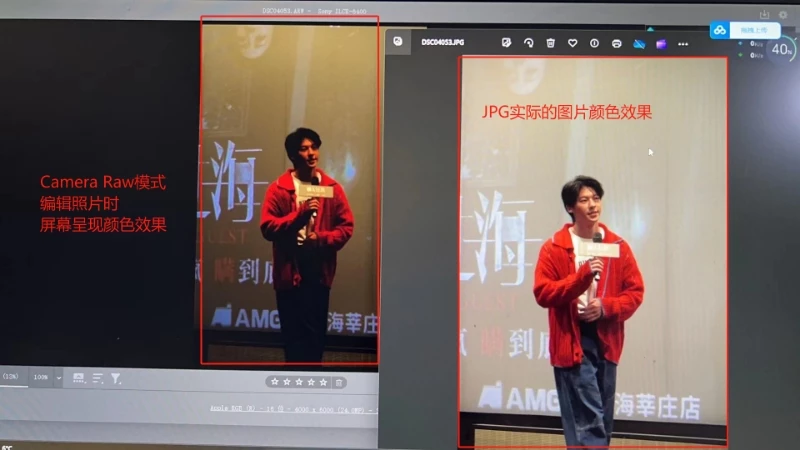
RAW格式的照片文件与JPG图片显示的色彩不同

  • January 5, 2024
  • 2 replies
  • 738 views

左边在PS中打开RAW格式的照片文件,屏幕呈现色彩明显与右边JPG图片显示的色彩不同。已尝试调整Camera Raw模式的色彩,但无用。也尝试过卸载PS重新安装+安装最新版Camera Raw插件,都没用。

This topic has been closed for replies.

2 replies

c.pfaffenbichler
Community Expert
Community Expert
January 5, 2024

https://www.take-a-screenshot.org/

What is the image’s Color Space? What are the Photoshop’s Edit > Color Settings? 

Please set the Status Bar to »Document Profile« and post screenshots with the pertinent Panels (Toolbar, Layers, Options Bar, …) visible.

josantgomez
Legend
January 5, 2024

Nada que corregir a los expertos que han publicado respondiéndote. Quizá no te hayas apercibido de que Windows Photos , cuando las imágenes están subexpuestas como la de la izquierda (raw) automáticamente corrige la exposición aumentándola.  A mi me parece que la principal diferencia entre ambas imágenes se debe a la exposición, más las otras razones que te han reflejado. Foto oscura, abres en Photos, durante menos de un segundo la ves oscura y después aparece con la exposición corregida.

Bojan Živković11378569
Community Expert
Community Expert
January 5, 2024

How do you get a JPG file? Is it converted from a RAW file? The first thing I can spot is that the viewers are not the same. A JPG file is viewed by a Windows app or something similar, while a RAW file is viewed in ACR. For a more accurate comparison, open both files in ACR or Photoshop.


I will tag @D Fosse to assist you.

D Fosse
Community Expert
Community Expert
January 5, 2024

Bojan is right. These cannot be compared. Windows Photos does not display the raw data, but the jpeg preview embedded in the file from the camera.


Even if it did display the raw data, it would be a different raw processing engine, with a different result.


When working with raw files, it's important to keep in mind that there is no such thing as an "original" image. A raw file straight from the camera sensor looks something like the top image here. To produce the bottom one, it has to be demosaiced and processed and interpreted: