
michaelm45695587
Participant
December 14, 2018
Question

Raw file automatically changes colour when brought into photoshop

  • December 14, 2018
  • 3 replies
  • 512 views

This started happening after my latest update. Current version is 19.1.6.

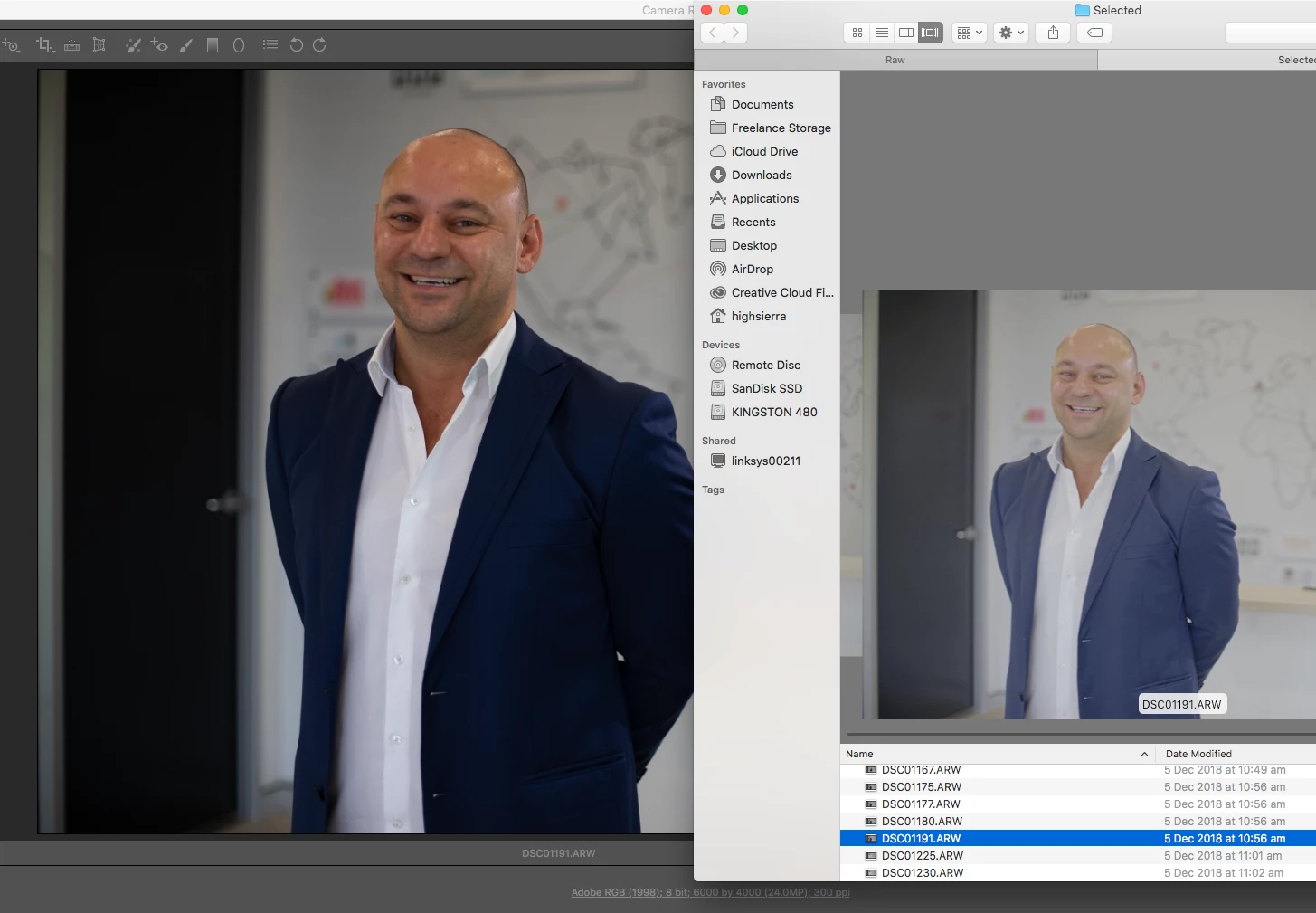
I take my images using a flat profile in camera. When viewing them in finder they appear as shot, however when brought into photoshop and even preview, they change colour drastically. This was not happening a month ago and I have not changed any settings in PS and the issue is becoming frustrating.

See screenshot attached for example.
    This topic has been closed for replies.

    3 replies

    michaelm45695587
    Participant
    December 15, 2018

    Thats really interesting but does make sense.

    The odd thing is that I followed the exact same process in the past, when I brought the images into PS the flat profile still appeared to be applied. As it doesn't seem to be working anymore I'll just change my workflow and not have any picture profiles on.

    Thank you for the help

    Participant
    December 14, 2018

    Exactly the same problem, but with all adobe products, the problem appeared 2 weeks ago, before that everything was fine. automatically edits all photos, even those that were taken in 2000. how to solve a problem?

    D Fosse
    Community Expert
    Community Expert
    December 14, 2018

    Did you read my reply above at all?

    Same answer: The camera-processed jpeg vs. the raw file displayed at ACR's default or adjusted settings.

    Participant
    December 14, 2018

    I'm sorry, your answer is not clear to me, google translate translates so that I do not understand anything. Can the answer be in the screenshots? I will be very grateful

    D Fosse
    Community Expert
    Community Expert
    December 14, 2018

    michaelm45695587  wrote

    I take my images using a flat profile in camera.

    That's the problem. Don't do that, it doesn't carry over into ACR.

    These camera settings are processing settings - they apply to the camera-processed jpegs. But a raw file isn't processed; it's just the light captured by the sensor.

    Preview doesn't show you the raw file, but the embedded camera-processed jpeg.

    You can make a preset or default in ACR that produces the same effect.