Participant
May 7, 2018
Answered

raw files converted to jpg to small

  • May 7, 2018
  • 4 replies
  • 2040 views

I am having trouble with raw to jpg conversion. I open a 10mb file from adobe brigde and edit it save it to a jpg in photoshop and the files are reducing to under 2 mb sometimes kb..I generally do little post edit. Can someone explain what I am doing wrong.

    This topic has been closed for replies.
    Correct answer Bob_Hallam

    File resolution is set in Camera Raw or Lightroom.  In ACR there's a link to that panel at the bottom of you frame.

    Click that text and it opens up the panel for the image processing prefs. Set those to the size and resolution you want for your final file. 

    Then you have an image that is at least the proper size before saving as a jpeg.

    When saving as a jpeg, remember this is a compressed format, and if you expect to edit the jpeg image you will get compression artifacts, so that is not ideal for high image quality reasons. 

    Saving as a jpeg you are given options, and those will determine the final file size as well. 
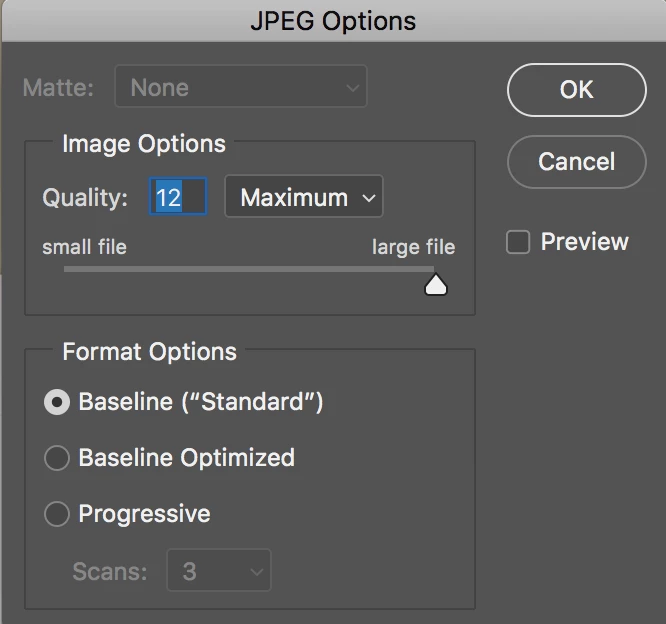
    Using Maximum Quality produces the least ammount of compression and the largest files, and moving the slider to the left will reduce file sized but increase compression artifacts. 

    4 replies

    Per Berntsen
    Community Expert
    Community Expert
    May 8, 2018

    kimberlyp32140547  wrote

    I am having trouble with raw to jpg conversion. I open a 10mb file from adobe brigde and edit it save it to a jpg in photoshop and the files are reducing to under 2 mb sometimes kb

    Image content has a significant effect on the file size of a jpg - large flat or smooth areas compress well (small file size), whereas sharp detail (and noise) is harder to compress (larger file size). So the file size of a jpg is not an indicator of quality or resolution.

    Consider the two images below, both exported at 80 quality from Lightroom. The bottom image has a file size 3.5 times larger than the top one, and the difference is entirely due to image content.

    41 kb

    146 kb

    Bob_Hallam
    Bob_HallamCorrect answer
    Legend
    May 8, 2018

    File resolution is set in Camera Raw or Lightroom.  In ACR there's a link to that panel at the bottom of you frame.

    Click that text and it opens up the panel for the image processing prefs. Set those to the size and resolution you want for your final file. 

    Then you have an image that is at least the proper size before saving as a jpeg.

    When saving as a jpeg, remember this is a compressed format, and if you expect to edit the jpeg image you will get compression artifacts, so that is not ideal for high image quality reasons. 

    Saving as a jpeg you are given options, and those will determine the final file size as well. 

    Using Maximum Quality produces the least ammount of compression and the largest files, and moving the slider to the left will reduce file sized but increase compression artifacts. 

    ICC programmer and developer, Photographer, artist and color management expert, Print standards and process expert.
    Legend
    May 7, 2018

    You can't get higher quality than the RAW has. In what sense is the resolution too low? Have you examined size in pixels? ppi? Actual quality?

    Legend
    May 7, 2018

    Why does that seem at all wrong? Raw files are bigger than JPEG.

    Participant
    May 7, 2018

    Yes, I understand raw is larger but I wanted a higher res jpg/