

NicciW23
Participant
October 1, 2018
Answered

Raw to Jpeg

  • October 1, 2018
  • 4 replies
  • 1884 views

I just bought a new camera, the 6D mark ii. I have adobe creative cloud, Photoshop and Lightroom. I am unable to open any of my raw images in either one of the programs... Is there some upgrade that I might need? Please assist.

Thank you
This topic has been closed for replies.
Correct answer JJMack

If it a Canon 6D Mk II its RAW CR2 Files should open in ACR 10 without a problem and I would think ins LR also I do not install LR.   CS6 in the creative cloud uses ACR 9.1.1 and would not be able to process Canon 6D Mk II CR2 files.

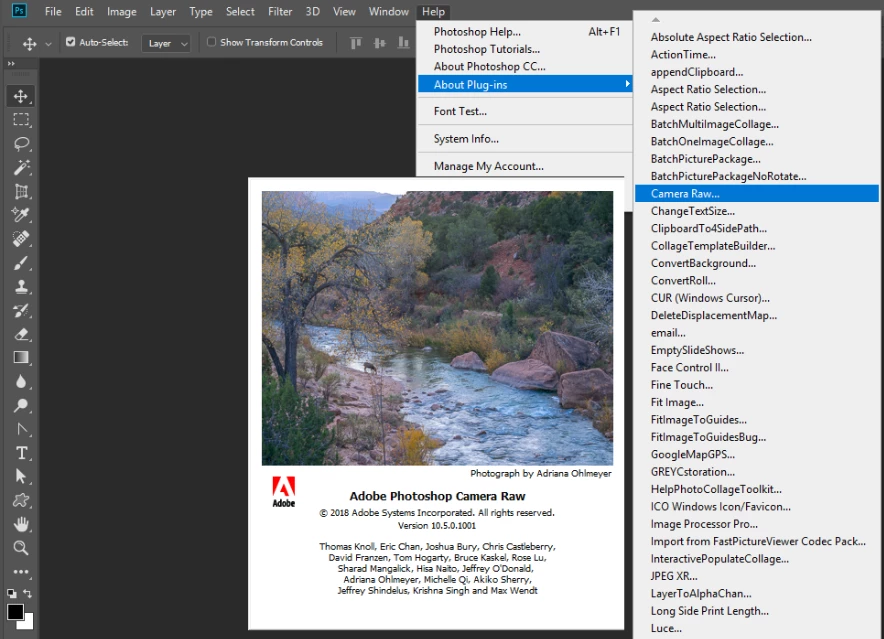
Use Photoshop CC 2018 menu Help>Ablout Plug-ins>Camera Raw... make sure it shows ACR version 10

4 replies

Abambo
Community Expert
Community Expert
October 1, 2018

Given the age of the 6DMII, you should be able to read 6DMII raw files as they do not have the specific „double pixel“ shift that a 5DM4 may use.

This leads to an not up to date Lightroom and Photoshop. It may happen that the CC App does not „see“ updates in the pipline. This is currently my case on one of my computers. The solution would be a fresh install, but I do not want to do that for other obvious reasons. So my solution is to monitor closely for updates (I have fortuneatly different computers that work fine) and to uninstall/install the programs to update.

ABAMBO | Hard- and Software Engineer | Photographer
Legend
October 2, 2018

Actually you say you have Creative Cloud. Please tell us your Photoshop version, it won’t be “8”. Use the About box Please.

JJMack
Community Expert
JJMackCommunity ExpertCorrect answer
Community Expert
October 1, 2018

If it a Canon 6D Mk II its RAW CR2 Files should open in ACR 10 without a problem and I would think ins LR also I do not install LR.   CS6 in the creative cloud uses ACR 9.1.1 and would not be able to process Canon 6D Mk II CR2 files.

Use Photoshop CC 2018 menu Help>Ablout Plug-ins>Camera Raw... make sure it shows ACR version 10

JJMack
NicciW23
NicciW23Author
Participant
October 2, 2018

Thank you for this tip. Mine is version 8... How do I go about updating it?

Legend
October 2, 2018

Version 8 of Photoshop is very old indeed. Is it actually Photoshop Elements 8?

Muqqarib Hassan
Inspiring
October 1, 2018

Hi,Read this Article it will help you how to open raw files in photoshop.

Thanks.

To set a preference so your raw photos open directly into Camera Raw:

  1. In Photoshop, go to Edit/Photoshop > Preferences (Ctrl-K/Cmd-K) > File Handling.
  2. Under File Compatibility, check Prefer Adobe Camera Raw for Supported Raw Files, then click OK. When you double-click a raw file, it will open into Camera Raw (as opposed to other software that can be used to convert raw files).
  • At the bottom of the dialog, from the JPEG menu, choose Automatically Open JPEGs with Settings.
  • If you shoot digital TIFF photos, from the TIFF menu, choose Automatically Open TIFFs with Settings; or if you shoot only raw or JPEG photos (not TIFF photos), choose Disable TIFF Support.
  • Click OK. 

Opening photos into Camera Raw

  • Under File Compatibility, check Prefer Adobe Camera Raw for Supported Raw Files, then click OK. When you double-click a raw file, it will open into Camera Raw (as opposed to other software that can be used to convert raw files).
  • At the bottom of the dialog, from the JPEG menu, choose Automatically Open JPEGs with Settings.
  • If you shoot digital TIFF photos, from the TIFF menu, choose Automatically Open TIFFs with Settings; or if you shoot only raw or JPEG photos (not TIFF photos), choose Disable TIFF Support.
  • Click OK.
  • If the Open in Camera Raw button c0054-01.jpg is available when you click a thumbnail in Bridge, it’s a sign that the file can be opened into Camera Raw.
  • Check Double-Click Edits Camera Raw Settings in Bridge if you want Camera Raw to be hosted by Bridge when you double-click a thumbnail in Bridge (a raw photo or a JPEG that was previously edited in Camera Raw), or uncheck this option to have the file open into Camera Raw hosted by Photoshop. Click OK.
Kanikas
Legend
October 1, 2018

Moving to Photoshop