
Known Participant
January 31, 2018
Question

Re: Error status 0xc000012f

  • January 31, 2018
  • 1 reply
  • 2781 views

I'm having the same issue, but not with Acrobat.  I'm getting the message from when I open Photoshop, After Effects and AME, with slight variations as seen below.
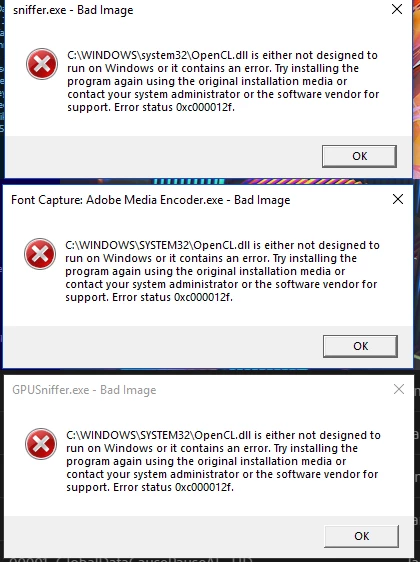
I thought perhaps it was my graphics driver (for NVIDIA GTX 960, Windows 10) that needed to be updated, but that didn't fix it. I've also uninstalled and reinstalled all three programs.  Do you think a cleaner tool for these apps would help.  If so, please provide a link.

Thanks!

    This topic has been closed for replies.

    1 reply

    AxelMatt
    Community Expert
    Community Expert
    January 31, 2018

    I think this is not a problem with your Adobe software. This is a problem with your operating system and/or driver, in your case it seems to be the graphic card driver.

    If you have tried the latest driver without success then try an older version of the driver (Beta and Archive Drivers | NVIDIA )

    When you install the driver do a clean install.

    Axel

    My System: Intel i7-8700K - 64GB RAM - NVidia Geforce RTX 3060 - Windows 11 Pro 25H2 -- LR-Classic 15 - Photoshop 27 - Nik Collection 8 - PureRAW 6 - Topaz Photo AI
    McStackAuthor
    Known Participant
    January 31, 2018

    Like I said, I thought it was the graphics driver too, so I updated it.  I'm curious why you recommend the clean install rather than the recommended.

    AxelMatt
    Community Expert
    Community Expert
    February 1, 2018

    McStack  schrieb

    I'm curious why you recommend the clean install rather than the recommended.

    If the installed driver is faulty and you installed a newer or  a older verson for this driver it is possible the error remains. So it could be that the new installed driver doesn't already worked.

    My System: Intel i7-8700K - 64GB RAM - NVidia Geforce RTX 3060 - Windows 11 Pro 25H2 -- LR-Classic 15 - Photoshop 27 - Nik Collection 8 - PureRAW 6 - Topaz Photo AI