
Participant
November 16, 2021
Answered

Re-Select previously selected layer in custom action

  • November 16, 2021
  • 3 replies
  • 662 views

Hi,


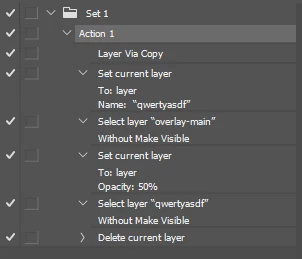
I would like to create a custom action in Photoshop which is supposed to do the following steps:

1. Select group "overlay-main"

2. Set its opacity to 50%

3. Select the layer (or group) which had been selected when the action was triggered (i.e. before step 1).


Is something like that possible with actions? An alternative would be an action-step which changes the opacity of a specific group ("overlay-main" in my case) without selecting it, i.e. without changing the layer selection at all. Is that maybe possible?


Or would I have to use the plugin API and write a plugin to achieve something like that?


Thanks,

Jan
This topic has been closed for replies.
Correct answer jazz-y

3 replies

jazz-yCorrect answer
Legend
November 16, 2021

c.pfaffenbichler
Community Expert
Community Expert
November 16, 2021

A nifty work-around! 

But if more than one Layer were selected at the beginning I think Scripting would be hard to avoid. 

Legend
November 16, 2021

If such layers go one after another, then we can create a group, and then ungroup it. If the selection of layers is arbitrary, yes, I think only with a script. But, I think, @Jan5E8E  does not need it.

Participant
November 16, 2021

For people who do not understand, really like ~ completely can't find the entranceT the administrator, please do not hold to see become a little bit about the.. A: the

Kukurykus
Legend
November 16, 2021

Moderator please mark above comment as the spam (unless that has sense I can't see).

Jan5E8EAuthor
Participant
November 17, 2021

I was thinking the same - either a stroke (I hope not) or a bot...

c.pfaffenbichler
Community Expert
Community Expert
November 16, 2021

For the time being a Script (in JavaScript) would suffice. 

Jan5E8EAuthor
Participant
November 16, 2021

Good idea, thanks - didn't know that there's a simple JS scripting API. I'll check that out for sure, a first glance at the provided scripts shows me that it's probably quite easy.