Djuna_A_
Known Participant
October 8, 2017
Question

Reading and adjusting the levels

  • October 8, 2017
  • 4 replies
  • 652 views

Hello,

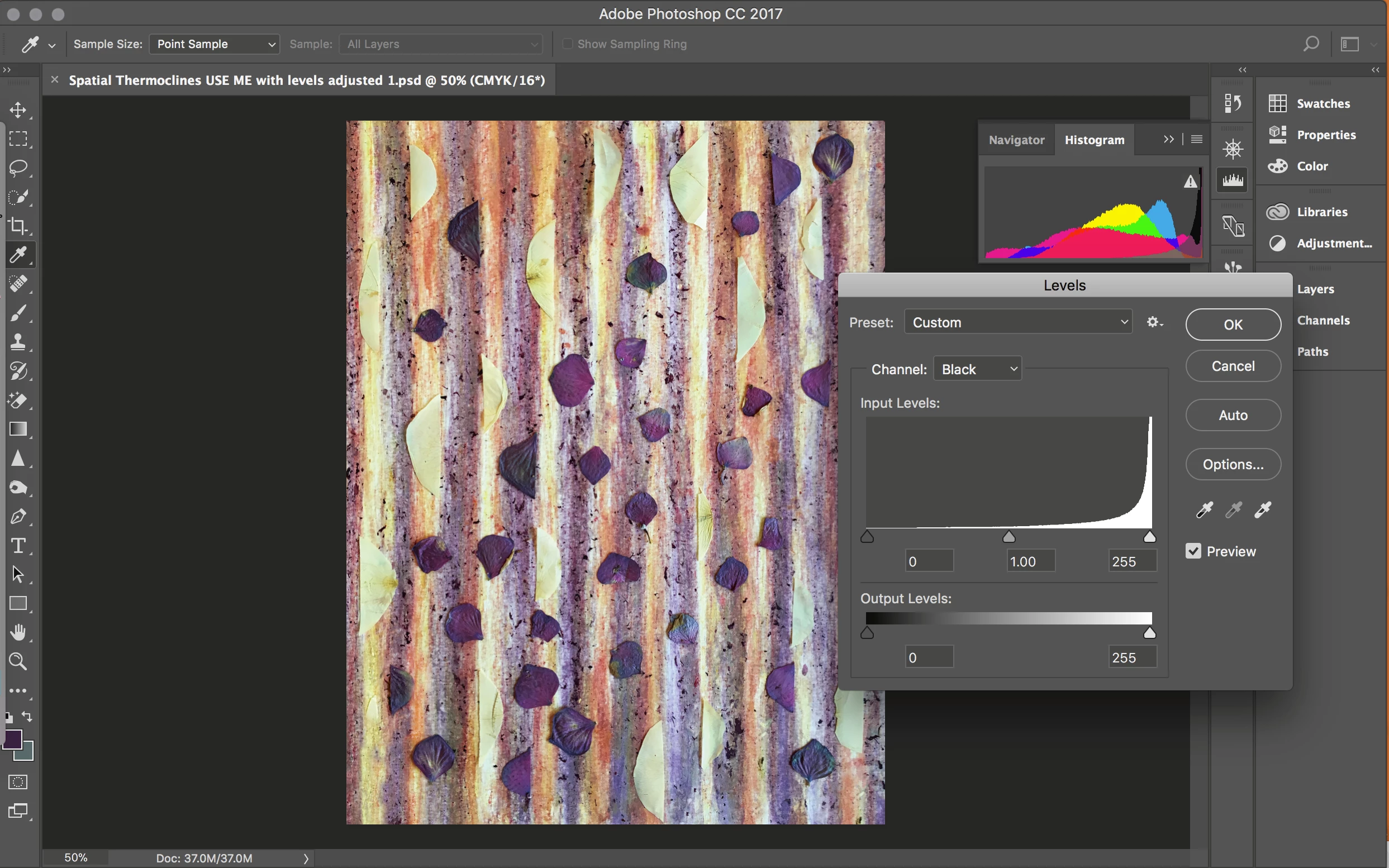
I'm learning the levels adjustment. I have a question about the spike of K (in CMYK mode) on the right side of the histogram. If I understand correctly, the right side is for highlights, and everything that appears shoved over to the right will be overexposed? If that's the case, why then when I move the slider on the black level from the far right over to the center, do the blacks in my image appear lighter? I also tried the option + click on my mac to show me the colors as they are clipped, but it doesn't seem to do anything.

Any input welcome.

Thanks!
    This topic has been closed for replies.

    4 replies

    Djuna_A_
    Djuna_A_Author
    Known Participant
    October 8, 2017

    D. Fosse (or anyone)

    I do know the profile -- Japan Color 2001 Coated.

    "Fiddling with sliders in CMYK, without thoroughly knowing what you're doing, is a disaster waiting to happen. For one thing, you can very easily exceed total ink limit, resulting in smearing and drying problems."

    Yes, I don't know what I'm doing thoroughly, that's for sure. But I have a monitor calibrator.  Is knowing the correct profile plus a monitor calibrator enough to adjust/use the sliders by sight and know that I won't exceed the total ink limit?

    It's too late to go back and do RGB everything -- but I'll know now for the future.

    Bojan Živković11378569
    Community Expert
    Community Expert
    October 8, 2017

    I will try my hands to give you technical explanation. When you move right slider to the left you are setting some grays as lightest portion in black channel or in other words you are lightening grays. When Photoshop re-calculate pixels with new range then you will get dark portion to appear lighter.

    If you want to darken pixels on your image (from histogram you can see that darkest gray and black does not exist) on your image then you should drag left slider to the right and to set some dark grays as darkest pixels. You can also darken black channel by dragging middle slider to the right or in other words to set some lighter gray to middle gray.

    davescm
    Community Expert
    Community Expert
    October 8, 2017

    The histogram for Black shows dark pixels on the left through to white pixels (no ink) on the right. So if you drag the white slider to the left more of the light grey image pixels are being moved into white. When you do this the gamma slider also moves to the new centre point so all the shades of grey above the darkest black also become lighter.

    Edit to add : My explanation was just to show the why.  D.Fosse is correct in his warnings above.

    Dave

    D Fosse
    Community Expert
    Community Expert
    October 8, 2017

    Yeah, working directly in CMYK is a minefield. I do it when called for, but I'm extremely careful every time. I've been doing it just enough to know the dangers. I always prefer working in RGB and convert at the end.

    D Fosse
    Community Expert
    Community Expert
    October 8, 2017

    My first thought is that you really shouldn't be working in CMYK at all until you have a lot more experience. CMYK is for sending material to offset presses, and the very first thing you need is the correct CMYK profile for the actual press/paper/ink used. The printer should give you this - and if they can't, go elsewhere because they're not running an up to date and reliable process.

    When you have this profile, standard procedure is to work in RGB and then convert to the CMYK profile on final output to press-ready PDF. Then you know everything will behave correctly on press.

    Fiddling with sliders in CMYK, without thoroughly knowing what you're doing, is a disaster waiting to happen. For one thing, you can very easily exceed total ink limit, resulting in smearing and drying problems.

    Summed up, standard procedure nowadays is to work in RGB and convert to CMYK as the very last step - performed by someone who knows what they're doing.