
Inspiring
October 26, 2024
Answered

Recent Changes to Save for Web (Legacy)

  • October 26, 2024
  • 2 replies
  • 395 views

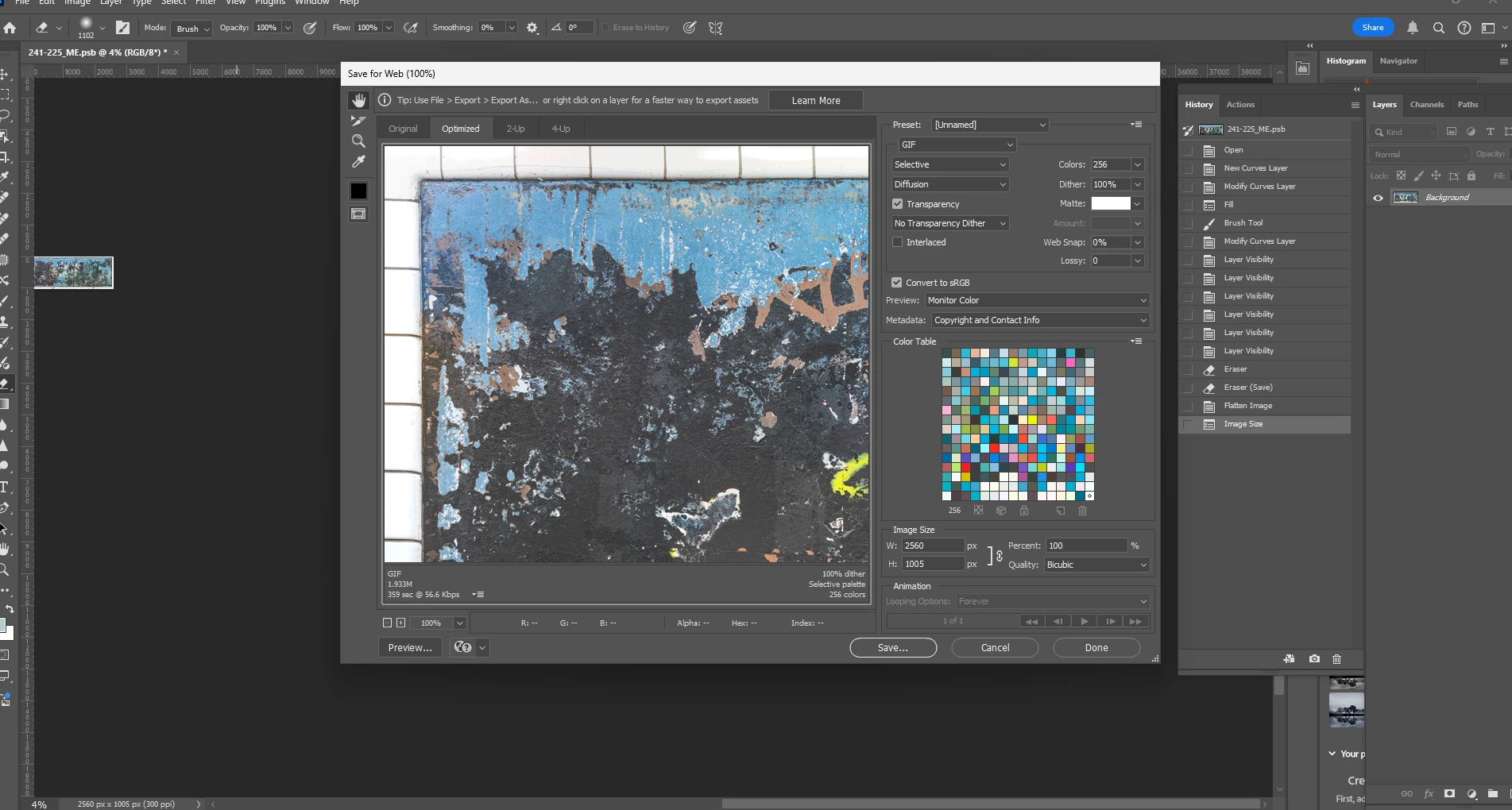
I just updated Photoshop and Save for Web (Legacy) has some new features.  I used to be able to adjust the quality of an image to get it under a certain size.  So for example from 2 MB to 800 KB.  Now that option (slider) has been replaced by "Colors" or at least that's what is in that position on the dialog box.  Am I suppsoed to lower the colors to accomplish this task now?  Going from 256 colors to 128 only results in a slight (about 10%) decrease, from 1.93 MB to 1.7 MB.  Thanks.  


This topic has been closed for replies.
Correct answer D Fosse

You're saving a GIF.


The quality slider applies to jpeg compression.

2 replies

Bojan Živković11378569
Community Expert
Community Expert
October 26, 2024

Use the dropdown list indicated in the screenshot below to switch to JPEG format.

Another option available is to optimize for file size; please see the screenshot below.

D Fosse
Community Expert
D FosseCommunity ExpertCorrect answer
Community Expert
October 26, 2024

You're saving a GIF.


The quality slider applies to jpeg compression.