
Participant
March 29, 2024
Answered

Red and Green Hues Randomly Appear in Bird Feathers - How Do I Fix?

  • March 29, 2024
  • 1 reply
  • 200 views

I'm using Lightroom CC 13.2  and 16.2 Camera Raw on a Mac Studio (Apple M1 Max, Ventura 13.2.1).

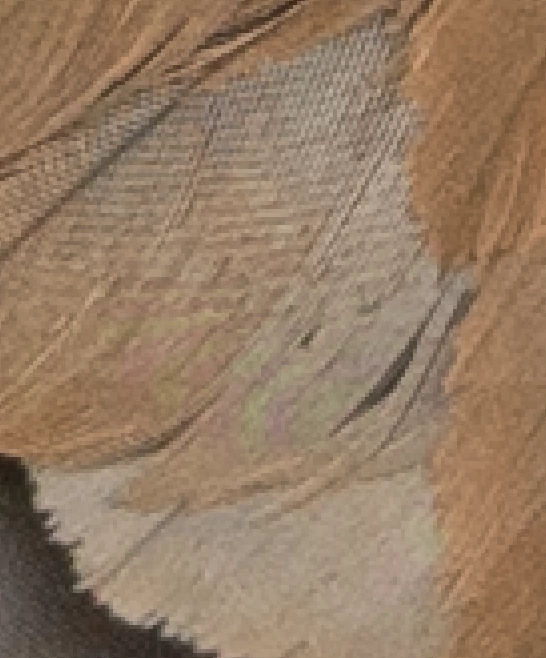
As you see in these feathers, red and green (which are not part of the bird's coloring) randomly appear. Is there a way to fix this in Photoshop? 

If not, what about in Lightroom CC?
Thanks for your help!
This topic has been closed for replies.
Correct answer Stephen Marsh

In the raw file processor, look at Detail > manual noise reduction: color (where you then may need to increase vibrance and or saturation to counter the desaturation introduced). This is a global edit, so you may prefer to use the mask brush and then the Moiré reduction option under Detail for a targeted edit of the affected areas.

1 reply

Stephen Marsh
Community Expert
Stephen MarshCommunity ExpertCorrect answer
Community Expert
March 29, 2024

In the raw file processor, look at Detail > manual noise reduction: color (where you then may need to increase vibrance and or saturation to counter the desaturation introduced). This is a global edit, so you may prefer to use the mask brush and then the Moiré reduction option under Detail for a targeted edit of the affected areas.

Participant
March 30, 2024

I'll try this out and report back to you. Thanks for responding, Stephen.

Participant
March 30, 2024

Well, Stephen, THAT was fast! Thank you! It worked like a charm. Check this out: