PaulReza
Participant
February 13, 2017
Answered

Redresser une image au rectangle

  • February 13, 2017
  • 1 reply
  • 895 views

     Bonjour,

     Comme d'habitude sur tout forum, on pose peut-être une question qui a déjà été répondue et résolue ailleurs, je m'excuse donc par avance au cas où ma démarche fait doublon. Seulement voilà, après quelques recherches, je n'ai pas trouvé de solution à mon problème.

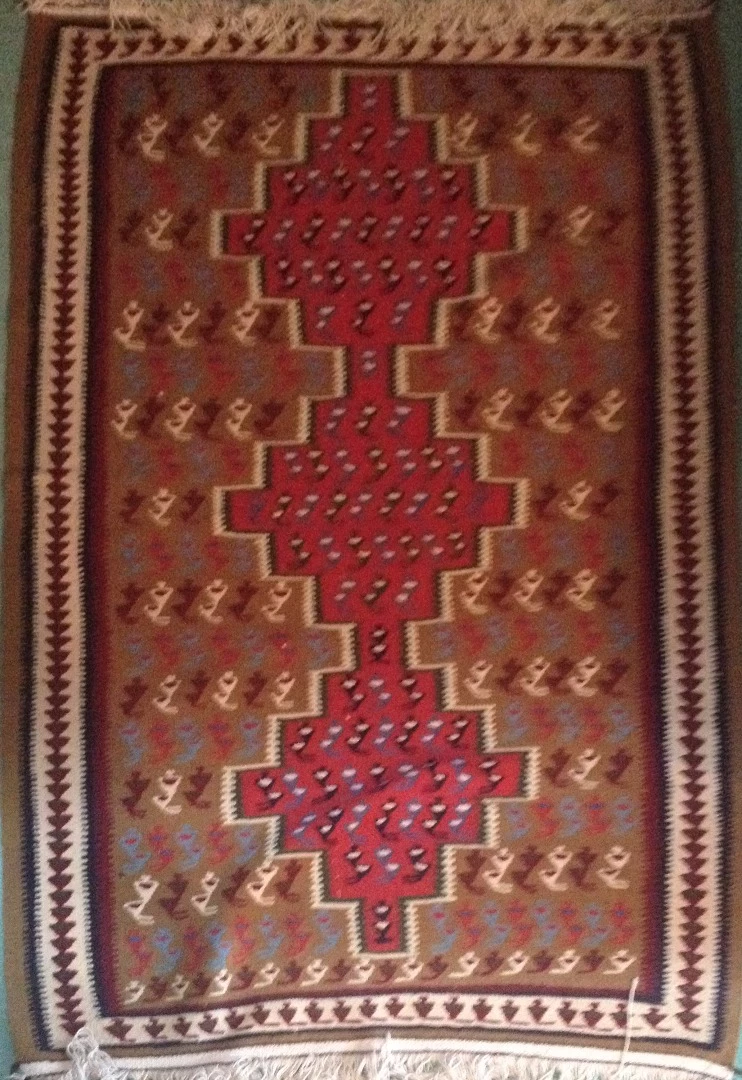
     J'aimerais en fait redresser une image. Celle ci est la photographie d'un tapis, qui, avec le temps, a fini par se distendre dans ses coutures, et courber sur les bords, notamment vers le coins, pour moins ressembler à un rectangle qu'à ceci ( ). Et j'aimerais fabriquer une image qui puisse ensuite servir de sorte de texture applicable à un modèle 3D lui bien rectangulaire. J'aimerais donc savoir s'il existe un outil dans Photoshop, ou un autre logiciel, chez Adobe ou ailleurs, qui permette de distordre la photo de mon tapis et lui faire une bonne tête au carré, et si oui, quelle serait la marche à suivre.

     Je vous met en copie un version en mauvaise qualité de la photo inculpée.    

     Cordialement,

     et merci d'avance pour le coup de main.

     Paul Rezakhanlou
This topic has been closed for replies.
Correct answer c.pfaffenbichler

Hello

As usual on any forum, this may be a question that has already been answered and resolved elsewhere, so I apologize in advance in case my approach makes duplicate. Only now, after some research, I have not found solution to my problem.

I'd actually like to straighten an image. This is a photograph of a rug, which, over time, by stretch in its seams, and bend on the edges, especially towards the corners, to look less like a rectangle to this (). And I would like to make a picture that could then serve as a sort of texture applied to a 3D model itself well rectangular. I would like to know if there is a tool in Photoshop, or another software, Adobe or elsewhere, that allows to distort the picture of my stack and make him a good head to the square, and if so, what would be the way forward.

I put you in copy a bad quality of the charged photo version.

Kind regards

and thanks in advance for the help.

Paul Rezakhanlou

Good day!

Both Edit > Puppet Warp and Filter > Liquify are options and they can both be applied as Smart Filters, so one can re-edit their settings without degrading the image unnecessarily.

Regards,

Pfaffenbichler

1 reply

c.pfaffenbichler
Community Expert
c.pfaffenbichlerCommunity ExpertCorrect answer
Community Expert
February 13, 2017

Hello

As usual on any forum, this may be a question that has already been answered and resolved elsewhere, so I apologize in advance in case my approach makes duplicate. Only now, after some research, I have not found solution to my problem.

I'd actually like to straighten an image. This is a photograph of a rug, which, over time, by stretch in its seams, and bend on the edges, especially towards the corners, to look less like a rectangle to this (). And I would like to make a picture that could then serve as a sort of texture applied to a 3D model itself well rectangular. I would like to know if there is a tool in Photoshop, or another software, Adobe or elsewhere, that allows to distort the picture of my stack and make him a good head to the square, and if so, what would be the way forward.

I put you in copy a bad quality of the charged photo version.

Kind regards

and thanks in advance for the help.

Paul Rezakhanlou

Good day!

Both Edit > Puppet Warp and Filter > Liquify are options and they can both be applied as Smart Filters, so one can re-edit their settings without degrading the image unnecessarily.

Regards,

Pfaffenbichler

melissapiccone
Community Expert
Community Expert
February 13, 2017

Transform, Warp - You can pull the points and mush it around

Melissa Piccone | Adobe Trainer | Online Courses Author | Fine Artist