piixy
Inspiring
March 19, 2018
Answered

reduce 544Mb to 5Mb

  • March 19, 2018
  • 3 replies
  • 8105 views

HI, is this the right way to go about it without loosing much of sharpness and detail? I  need to resize a 544Mb file (that was originally  designed as Fine Art  for print with loads of details and no vectors) to only 5Mb

1- I decreased the width down by 50% while resampling ,  bringing it down to 136MB

2- I exported choosing web legacy , and dropped the width to almost 40% ending up with a 5MB jpeg .

Thanks!
This topic has been closed for replies.
Correct answer piixy

If you read their FAQ, you'll understand that submissions are not the final billboard size.

If you are a selected artist we will contact you about reformatting your file to fit on the specific billboard.

So keep your original PSD files. 

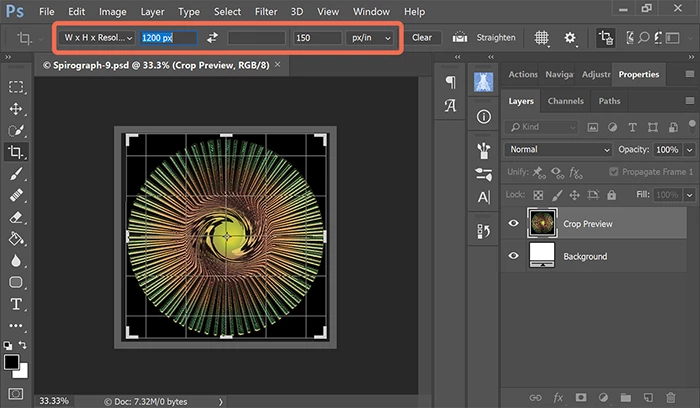
I would use the  crop tool to resize image to 1200px (longest side) and 150 dpi.

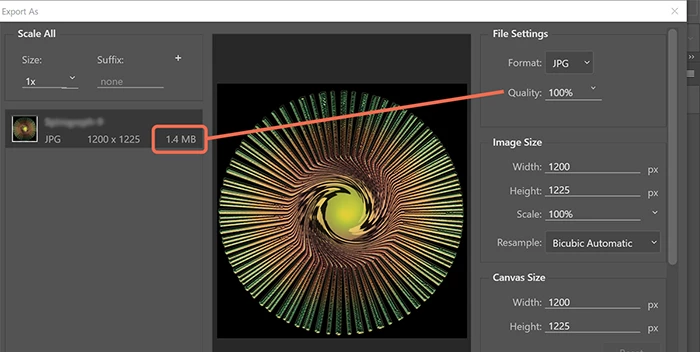
File > Export > Export As > JPG.   Note the file size is only 1.4 MB with Quality set at 100%.

Nancy


TKX Nancy!!:) will keep that in mind and next time i’ll have to check the FAQ !

3 replies

rayek.elfin
Legend
March 19, 2018

Agree with Nancy - all this talk about file sizes is pretty much useless without learning more about the requirements.

Could you provide us with a link to the billboard competition?

rayek.elfin
Legend
March 19, 2018

Found it!

Submit 2018 — The Billboard Creative

Within this context a typical 6x4 meters sized billboard at 30dpi would generally suffice. With larger billboards and increasing distances  the dpi of the print will be reduced further, i.e.: 5.4 by 14.6 meters a typical template would be 592x2052 pixels. You'd work at 300ppi at this resolution in Photoshop, and it would, when printed and put on the physical billboard, be a mere 8.7dpi at full size.

Photoshop can't handle the actual sizes, so you would have to work at a higher ppi, and later this is upscaled.

Nancy OShea
Community Expert
Community Expert
March 19, 2018

Well if that's the contest site, the deadline was yesterday .

  • Deadline: Due to a technical glitch we have extended submission period to March 18, 2018
  • Image format for submission: JPEG or JPG- File dimensions: 1200 pixels or greater on the longest side. Anything larger than 1200 px will be resized to fit the limitations. File size: under 5 MB
Nancy O'Shea— Product User & Community Expert
Nancy OShea
Community Expert
Community Expert
March 19, 2018

What finished dimensions must you submit?  You told us under 5 MB but what height, width and dpi are they asking for? 

Nancy O'Shea— Product User & Community Expert
piixy
piixyAuthor
Inspiring
March 19, 2018

Hi Nancy!he requirements were very vague, nothing abt resolutionor precise sizes  just 5Mb max size with min width 1200px

JJMack
Community Expert
Community Expert
March 19, 2018

An image file that is 544MB in size is usually not a single layer like a Jpeg or PNG file.  It would most likely be a layers file like a PSD, PSB or Tiff file that may on may not have compress the pixel data.  The first thing you should do is with the document open in Photoshop save out a Jpeg image file in a folder using quality 10.  See how big that saved jpeg file is.  What do you need the smaller file for.  If the is for the Web  the  number  of Pixel you have for a print will be too many pixels for a display image.   A 4K display can only display an image 3840x2160px.   You need to know what web size image you need  or want.     Web Image are normally Jpeg or PNG images and are rarely large in file size.  If they are large its most likely not image data but Ancestor metadata  that is causing the large file size. Here are two 1K 1920x1024 Web images the black one is 72KB the noise one is 5MB in size.  I would consider these are large Web images 1920x1080 px.  Image with fine details  do not compress was well as  an image  with little to no detail.  72KB to 5MB quite a range for the same size images

JJMack
piixy
piixyAuthor
Inspiring
March 19, 2018

Many thanks JJMAck for your quick reply:)!! You guessed right the file is a psd layered , which I flatened , and when I saved as jpeg 10 as u recommended , I ended up with a 106.3Mb file.

Sorry should have been more precise. The file was originally designed to be printed on fine art paper 300dpi 150x100cm . It's 8bits/chanel RGB mode

Later I wanted to participate in a billboard competition that requires a 5Mb max file with min width 1200pixels.

D Fosse
Community Expert
Community Expert
March 19, 2018

Here's my opinion about jpeg:

Anything above quality 8 is pointless. You still get the jpeg degradation, rendering the file useless for archival or critical purposes - but you don't take out the full potential for size reduction. Going from quality 10 down to 8 may reduce file size to half, without any immediate visual difference.

A jpeg at quality 8 will usually look perfectly fine, as long as that is the final state, not worked upon subsequently - and it is reproduced at intended size.

But again, jpegs should only ever exist as copies, never originals.