Start with a blank doc in 8-bit RGB mode. From the main menu, Image > Mode > Indexed Color, which will bring up this dialog:
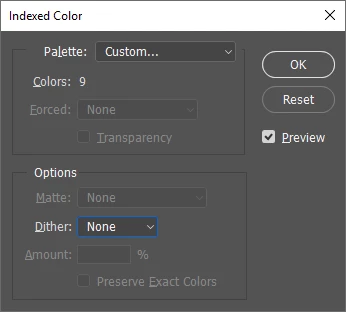
For Palette, choose Custom. You will see the Color Table dialog, and from there, you can add your colors. If you then save the palette as a .ACT file, you can then load it into your Swatches Panel. You will still be able to select any color for your Foreground and Background colors, but they will only paint in colors in the Color Table, which is why it;s a good idea to load them into your Swatches. You can also use the same Color Table in another doc by choosing that instead of Custom.
If you alter the Color Table while you doc is open, it will update to show the changes, but they will not change in the Swatches Panel, unless you save the Color Table as a new .ACT file and load it into Swatches.
When your project is complete, you can then convert it back to RGB.

 AdChoices