
Reducing image size and resampling makes image objectively darker
Sometimes, when I reduce the size of an image in PS, it gets darker - both visibly and confirmed by the data in the Info Window.
Here is an example:
The first image is 16 x 40 inches at 240 ppi (3840x9600 px).
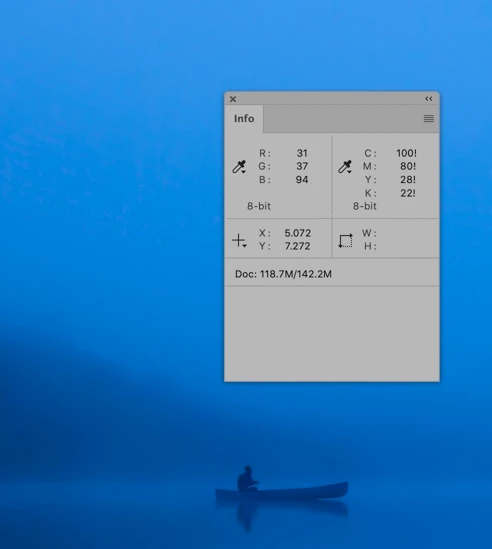
I wanted to make a smaller print at a higher resolution so I reduced it using Image Size. Resampling was on and I chose Bicubic Sharper (Reduction) as the resampling method.
I set the new size at 8x20 at 360 ppi (which gave me a smaller image that is 2880x7200 px).
The cursor is on the same point of the very front of the canoe in both images, but the Info Window shows different values ... and the image looks much darker on screen.
I have repeated this multiple times, restarted PS, etc with the same result.
Does this make any sense to anybody?
Thanks for any help.
First image (before reduction):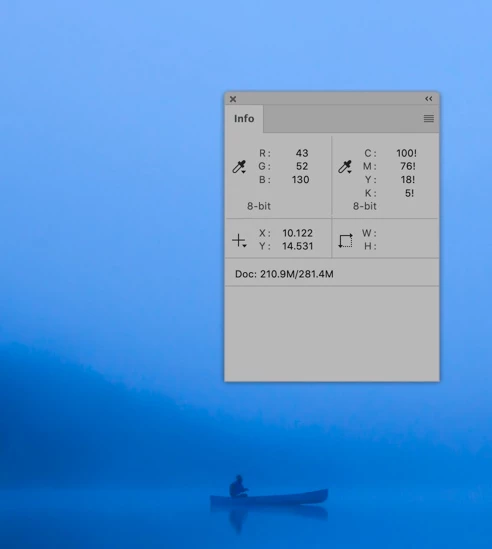
 AdChoices