
Known Participant
June 3, 2018
Answered

Reduction in Available RAM

  • June 3, 2018
  • 5 replies
  • 5728 views

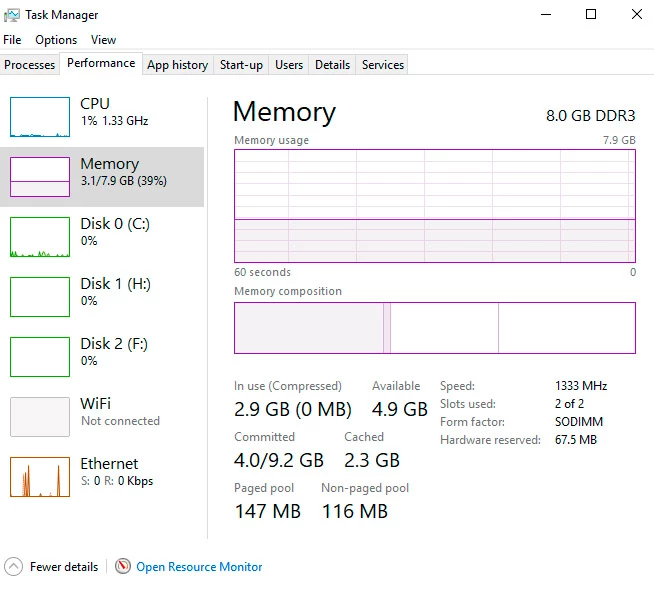
Pretty certain that the Available RAM under Memory Usage of the Performance tab, in my Photoshop CS6 (64 bit) running in 64 bit Windows 10, used to be much closer to the installed 8GB, though less than that figure.

However, it now seems to be only 3337 MB. Not really sure when this change took place. Last time I was doing some intensive Photoshop work was...actually back a the start of the week, Monday 28th May and I'm pretty sure I would have whacked the "Let Photoshop Use:" amount up quite a bit and don't remember thinking, "Oh, why only 3337 MB"

Just done a Windows Memory Diagnostic check which showed no errors. Will try another more thorough RAM check in a moment. Below is some memory info in the Task Manager. Any one else experienced this?
This topic has been closed for replies.
Correct answer davescm

Hi

Try the workaround here and see if it helps you

Error while accessing performance preferences - 'An integer between 96 and 8 is required.'

Dave

5 replies

Participant
June 7, 2018

My windows 10 had a large update on Tuesday

Known Participant
June 7, 2018

Hi heathert36881419

The workaround in the first reply comment from davescm seems at least to have restored the Available Memory issue in my version of CS6...and seems like most reports have been coming from CC users...and the last big Windows 10 update, to version 1803 is the culprit.

Error while accessing performance preferences - 'An integer between 96 and 8 is required.'

The workaround has a couple of small errors in it. When editing the registry the entry that you modify need set the Base to Decimal first and then enter the value of your RAM, so for me with 8GB that = 8 x 1024 = 8192 (NOT 8196 as is written in the workaround...the other work around error being the order of choosing Decimal and entering value. The folder you enter this value you in might not be 120.0 either. I only had 60.0 to choose from, which represents the version of Photoshop that I have, CS6.

I hope that helps (if this is part of the problem that you have been experiencing?) AND that I see a difference in performance now.

Participant
June 7, 2018

I’ve had problems ever since the latest Windows update

June 7, 2018

Hi

It would help if you provided more info, exactly what problems are you having, is it related to the RAM errors and if so have you tried the above fix.

If not please take a look here

ASK- Forum Success Guide: Efficiently using the forums

Especially this bit "Tips for effective posting"

Known Participant
June 7, 2018

The exact problem is that at the start of last week Available Memory to Photoshop (within the dialogue box I just posted) was much closer to the 8GB that I have installed. A few days ago I realised that it was only 3,337MB.

Trying that workaround, as described above, has now resulted in ridiculous "Available RAM" figures.

As I said earlier, I was not getting that Error message, but it was suggested that I still try the Workaround.

PECourtejoie
Community Expert
Community Expert
June 7, 2018

It should be the version you are using indeed.

Anyways, a key there could only affect Photoshop. You should use the value 8192

Known Participant
June 7, 2018

Was just wondering that...and that would tally with the fact that it is CS 6 that I have.

Known Participant
June 7, 2018

Still not had time to try the work around yet. Too much to do in the next two days and PS seems to be coping with the reduced RAM allowance. If it throws a fit I will give it a go, but if not will be the end of the month (after a holiday). Maybe others with the same problem may have tried this by then...ah yes, you already said that they had, successfully. Well, hopefully I will find the same.

PECourtejoie
Community Expert
Community Expert
June 7, 2018

chrisstonehill​ hello, go to preferences>Memory, and if you see that error, you might need to do the regedit.

Known Participant
June 7, 2018

I don't see the error message that davescm​ posted about...just that the Available Ram (when in Preferences/Performance) is only 3336MB when as recently as the start of last week I'm sure it was much closer to the 8gb of ram that I have.

PS struggling with a big file now, so started to have a look at the workaround posted above. Backed up the registry. I don't see the ultimate folder to navigate to, 120.0. I only have 60.0. Should I create the New > DWORD (32-bit) Value there?

davescm
Community Expert
davescmCommunity ExpertCorrect answer
Community Expert
June 3, 2018
Known Participant
June 3, 2018

Thanks. I'll try this tomorrow. Heading sleepwards in Norway now.