

Redundant Layer Style Problem
Hi!
I've come across an issue with unwanted extra layer styles showing whenever I am working on a Photoshop file. It basically looks like this:
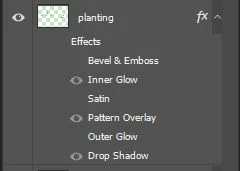
So in this layer I only need 3 styles - Inner glow, Pattern overlay and Drop Shadow. But instead of just showing the 3, all unwanted styles just show up (I didn't even touch them when adding the styles). And what's more, even files with layer styles that show normally on others' computer become 'redundant-styled' once it's opened on my computer, and stays redundant next time others opening it. It's just causing a lot of inconvenience.
I don't know if it's because of a certain version of PS? or setting? I tries to dig through the settings but haven't have any luck yet...
Anyone has the same problem as I have? Any solutions please?
Thank you in advance!
 AdChoices