mervinj1361984
Participant
September 25, 2017
Answered

Refine Edges in the Selection Menu?

  • September 25, 2017
  • 4 replies
  • 2333 views

Hi,

I had a wonderful option in Photoshop called Refine Edges in the Selection Menu. That spared me a lot of time by using it. I used it to cut objects out of a background, it worked perfect for what I needed and really fast. Now I had to reinstall the Photoshop (the latest version, 2017), due to a computer problem, and Refine Edges is nowhere to be found now. Has Adobe gave up Refine Edges from the Selection Menu in the newest versions of Photoshop? Which is the last Photoshop version where I can still find the Refine Edges? Thank you for your answer!
This topic has been closed for replies.
Correct answer davescm

Just to clarify the answers above.

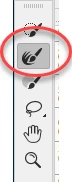
If you have chosen any selection tool you will see "Select and Mask" in the options bar (as shown by Angie).  This opens the Select and Mask workspace which has a number of selection tools within it. The second down on the toolbar, in that workspace is the new refine edge tool.

This new refine edge tool does work differently to the old. Most times I find it better. However, there are occasions where the old refine edge tool is needed.

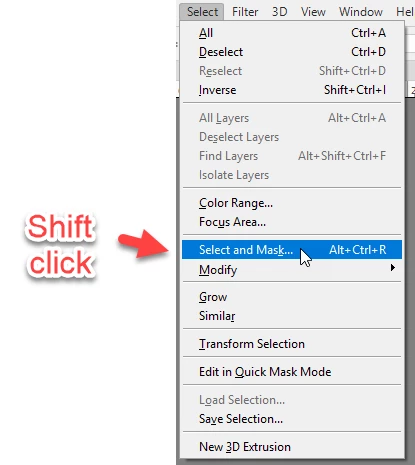
For that you have to do what Mohammad.Harb suggested which was go to the old refine edge tool. To do that, with a selection made,  hold down shift whilst clicking on Select and mask in the drop down menu. It does not work from the Select and Mask button in the options bar.

Dave

4 replies

mervinj1361984
Participant
September 26, 2017

Thank you so much guys for your answers! I will use your advice!

davescm
Community Expert
davescmCommunity ExpertCorrect answer
Community Expert
September 25, 2017

Just to clarify the answers above.

If you have chosen any selection tool you will see "Select and Mask" in the options bar (as shown by Angie).  This opens the Select and Mask workspace which has a number of selection tools within it. The second down on the toolbar, in that workspace is the new refine edge tool.

This new refine edge tool does work differently to the old. Most times I find it better. However, there are occasions where the old refine edge tool is needed.

For that you have to do what Mohammad.Harb suggested which was go to the old refine edge tool. To do that, with a selection made,  hold down shift whilst clicking on Select and mask in the drop down menu. It does not work from the Select and Mask button in the options bar.

Dave

angie_taylor
Legend
September 25, 2017

If you select any of the selection tools, or have a Live selection, it should show up on the Control Panel. It has been renamed as "Select and Mask"

Mohammad.Harb
Community Expert
Community Expert
September 25, 2017

refine edge will show up If you press shift Key then click on select and Mask