
TomHu
Inspiring
January 9, 2019
Question

Remembering Export Settings

  • January 9, 2019
  • 2 replies
  • 886 views

In Photoshop CS6, when I exported a file and changed any of the settings in the export window, the next time I exported a file those settings were remembered and I didn't have to reset them all for each export.

In Photoshop CC 2019, the Export settings are reset each time I do an export to these settings:
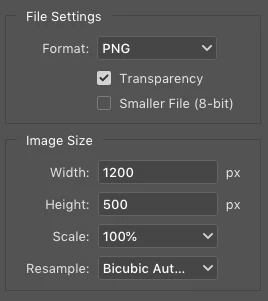
I want to export a JPEG at 70% quality most of the time, which means I have to change a few settings every time I do an export. Is there no way to make these settings stick as it worked in PS CS6? I don't like the Quick Export option because it doesn't allow me to alter any of the settings before saving the export, and sometimes I like to tweak the quality setting for a JPEG to get a good file size, which I can't do with Quick Export.

    This topic has been closed for replies.

    2 replies

    Stephen Marsh
    Community Expert
    Community Expert
    January 19, 2019

    In CC2018 the last used preset from the dropdown menu is retained, so this must be an issue in your build of CC2019.

    Participant
    January 18, 2019

    I have the same problem. Current 20.0.2 release does not remember my export settings after quit. Very annoying.

    gener7
    Community Expert
    Community Expert
    January 18, 2019

    I'm not seeing this problem in the Mac version of CC 2019.

    If you hold down the Alt key, the Cancel button in the dialog changes to Reset, which will allow you to reset the dialog and see if this fixes it.

    Participant
    January 18, 2019

    Save for Web legacy is exactly what I use and it's not remembering settings after quit.