mariannal21350910
Participant
April 24, 2017
Answered

Remove Brush Wet Edges

  • April 24, 2017
  • 2 replies
  • 2574 views

Hi guys,

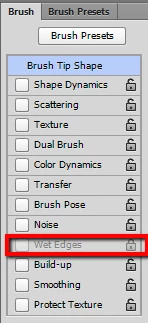
Please, let me know how to remove Wet edges in the Brush panel, when it's gray and locked. Thanks!

This topic has been closed for replies.
Correct answer mariannal21350910

Gosh! I had Dissolve Brush mode - my mistake.

Thanks David!

2 replies

mariannal21350910
mariannal21350910AuthorCorrect answer
Participant
April 24, 2017

Gosh! I had Dissolve Brush mode - my mistake.

Thanks David!

davidc1815
Legend
April 24, 2017

I don't think you can.  But if it's not active why does it bother you?

If you are troubled by the apparent watercolour wash effect you get when you overlap brushstrokes this is a function of the Opacity setting.  You need to set Opacity to 100% to stop the overlapped stroke transparency.  The Wet Edges feature will not get rid of the transparent, wash look.  It adds the dried pigment edge look you get with transparent watercolour paint washes, where the sediment dries at the edge of the paint.  Wet Edges, and reduced Opacity, and a Spatter Brush tip make for a nice watercolour look.

David