AG_Ps_100
Inspiring
February 10, 2019
Answered

Remove minor subpaths - Subtract small selections

  • February 10, 2019
  • 2 replies
  • 3969 views

Hello everyone,

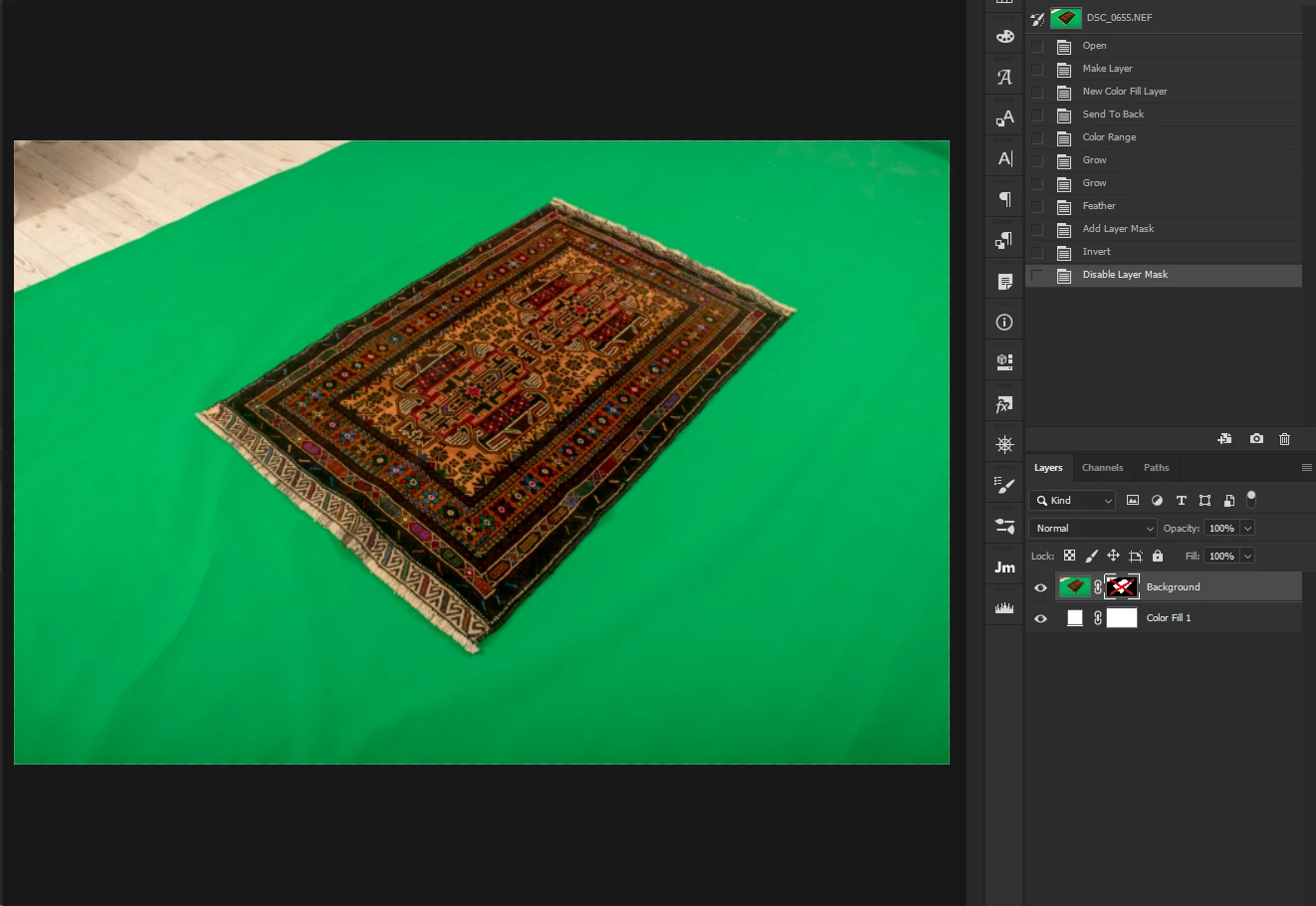
I have an image where I selected the green screen using color range. Sometimes I have greens inside my object so they will be deleted, and I try to avoid that.

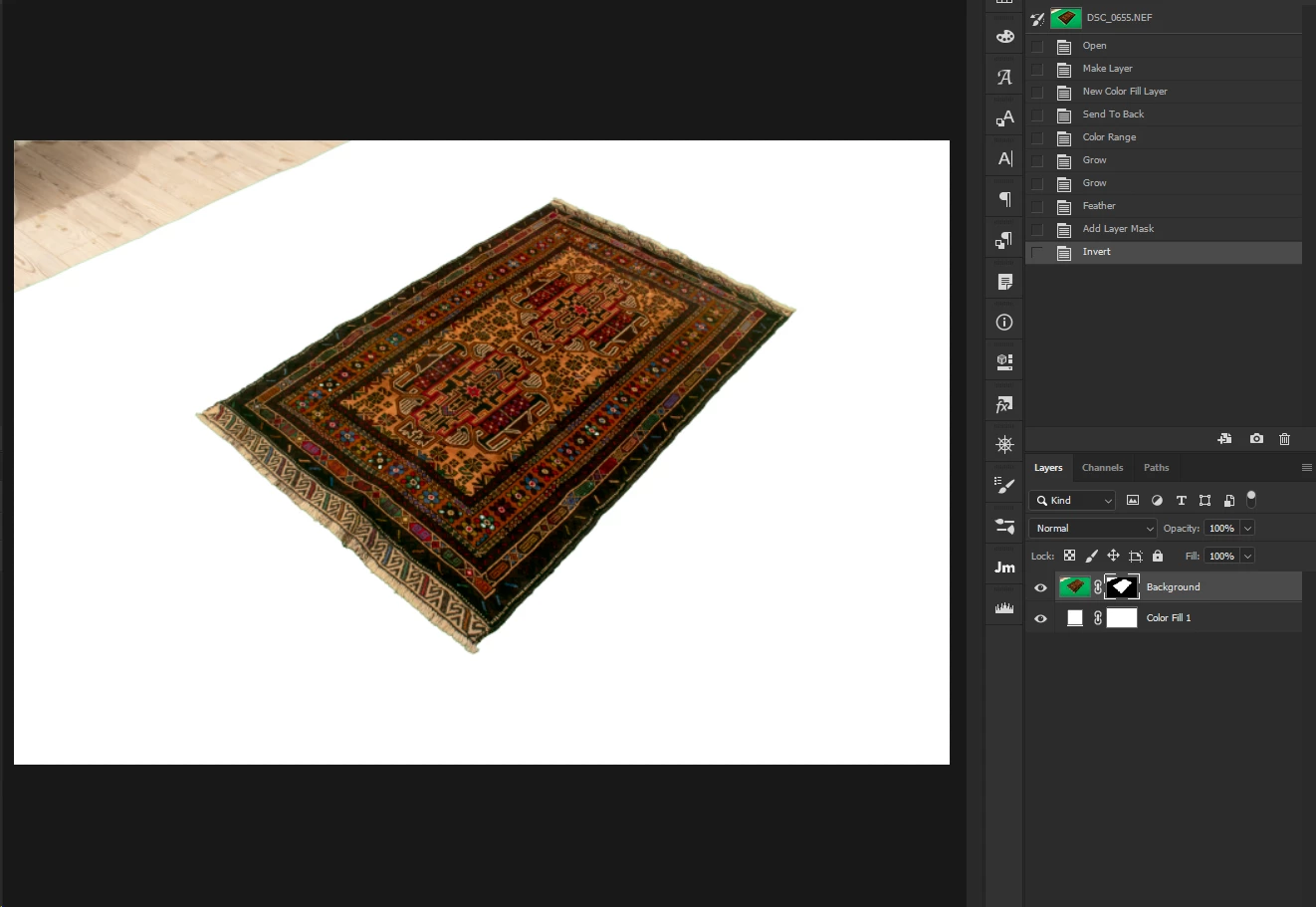
So I created a layer mask (in the same way it can be a selection).

original picture:

created a mask (isolated the background):

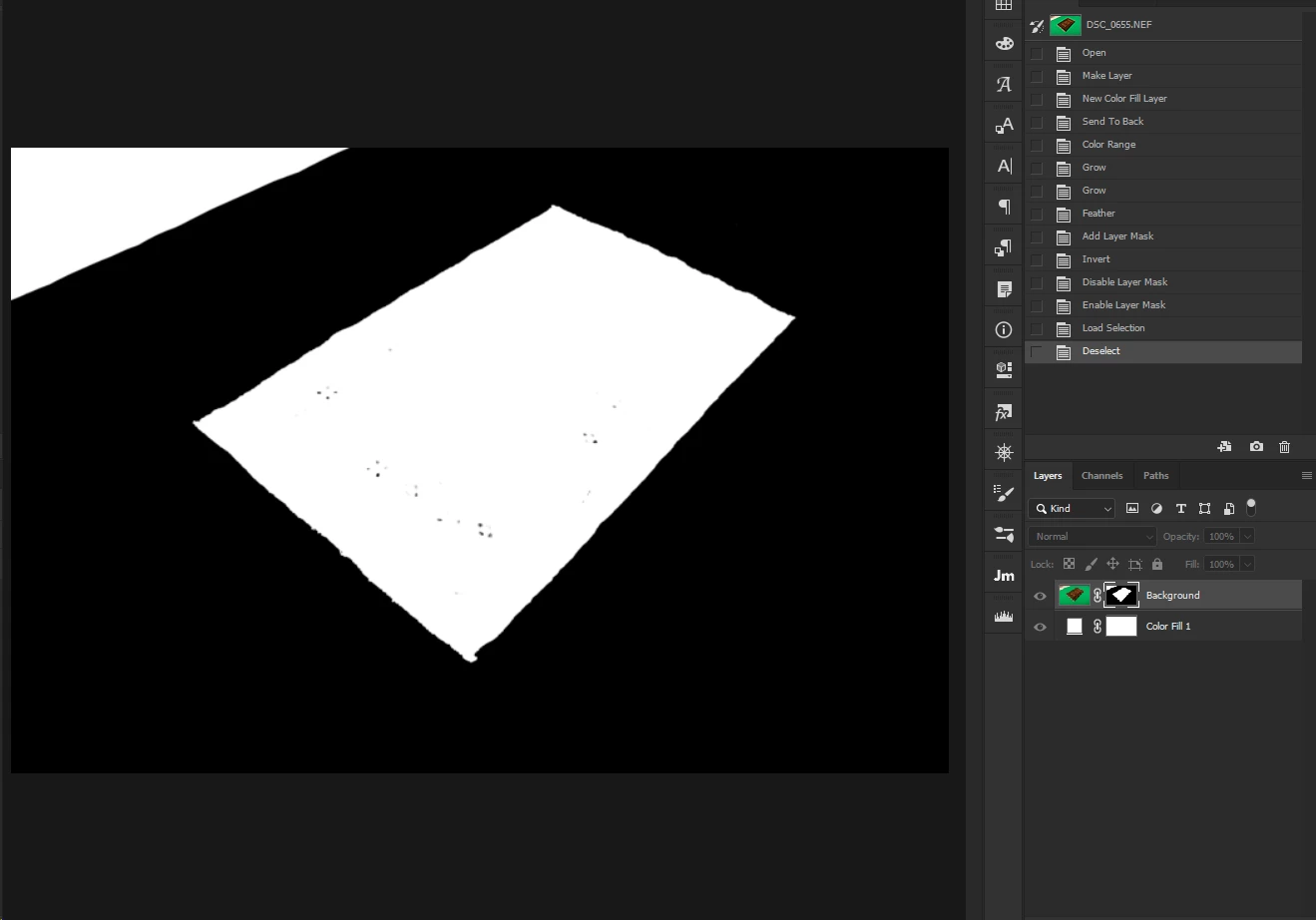
show the mask:

(as you see my object isn't entirely white)

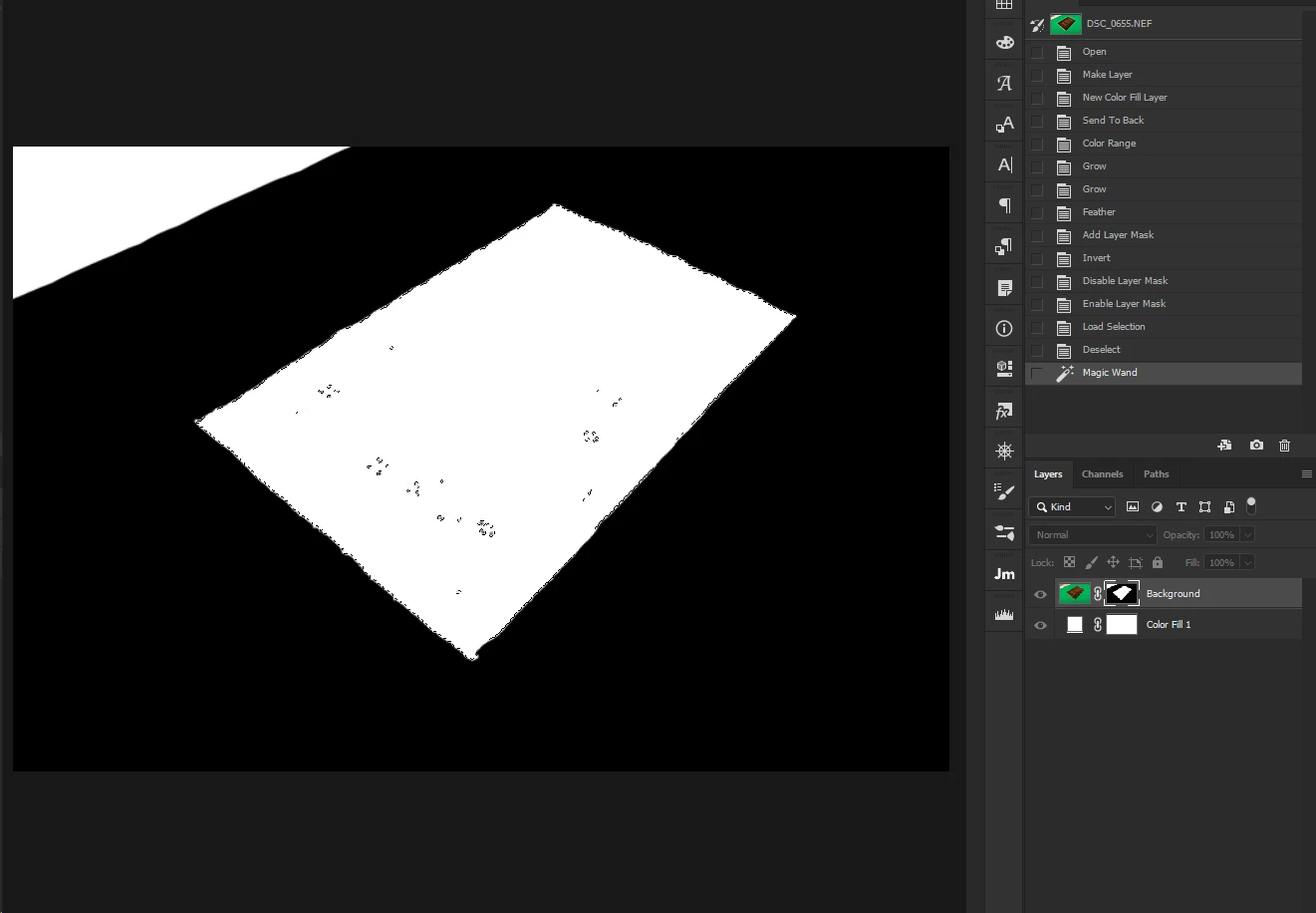
I've scripted a MagicWand click on the middle of the canvas, because my subject is almost always in the middle.

so right now I'm here:

How do I make all the small selections inside it merge into one? (I thought of a script that finds all the subpaths inside a selection and then removes them)

Any help will be much appreciated

This topic has been closed for replies.
Correct answer AG_Ps_100

i found that you and r-bin already answered me for something else that does the same thing! (thank you again)

i'll share it for others to use as well

select_max_selection();


    function select_max_selection()

        {

        try {

            // selection to workpath

            var d = new ActionDescriptor();

            var r = new ActionReference();

            r.putClass(stringIDToTypeID("path"));

            d.putReference(stringIDToTypeID("null"), r);

            var r1 = new ActionReference();

            r1.putProperty(stringIDToTypeID("selectionClass"), stringIDToTypeID("selection"));

            d.putReference(stringIDToTypeID("from"), r1);

            d.putUnitDouble(stringIDToTypeID("tolerance"), stringIDToTypeID("pixelsUnit"), 0.5);

            executeAction(stringIDToTypeID("make"), d, DialogModes.NO);


            // leave only one subpath with maximum points;

            var d = new ActionDescriptor();

            var r = new ActionReference();

            r.putEnumerated(stringIDToTypeID("path"), charIDToTypeID("Ordn"), charIDToTypeID("Trgt") );


            var pth = executeActionGet(r).getObjectValue(stringIDToTypeID("pathContents"));          

            var lst = pth.getList(stringIDToTypeID("pathComponents"));          


            var list = new ActionList();              

            var len = lst.count;


            var max;

            var max_obj;


            for (var i = 0; i < len; i++)

                {

                var obj = lst.getObjectValue(i);


                var count = obj.getList(stringIDToTypeID("subpathListKey")).getObjectValue(0).getList(stringIDToTypeID("points")).count;


                if (!max || max < count)

                    {

                    max = count;

                    max_obj  = obj;

                    }

                }


            max_obj.putEnumerated(stringIDToTypeID("shapeOperation"), stringIDToTypeID("shapeOperation"), stringIDToTypeID("add") );

            list.putObject(stringIDToTypeID("pathComponent"), max_obj);          


            var r = new ActionReference();

            r.putProperty( charIDToTypeID( "Path" ), charIDToTypeID( "WrPt" ) );


            d.putReference( stringIDToTypeID( "null" ), r );

            d.putList(charIDToTypeID("T  "), list);


            executeAction(charIDToTypeID("setd"), d, DialogModes.NO);


            // workpath to selection


            var d = new ActionDescriptor();  

            var r = new ActionReference();  

            r.putProperty(stringIDToTypeID("channel"), stringIDToTypeID("selection"));  

            d.putReference(stringIDToTypeID("null"), r);  

            var r1 = new ActionReference();  

            r1.putProperty(stringIDToTypeID("path"), stringIDToTypeID("workPath"));  

            d.putReference(stringIDToTypeID("to"), r1);  


            d.putBoolean(stringIDToTypeID("antiAlias"), true);  

            d.putUnitDouble(stringIDToTypeID("feather"), stringIDToTypeID("pixelsUnit"), 0);  


            executeAction(stringIDToTypeID("set"), d, DialogModes.NO);  


            // delete workpath


            var doc = app.activeDocument;


            for (var i = 0; i < doc.pathItems.length; i++)

                {

                if (doc.pathItems.kind == PathKind.WORKPATH)

                    {

                    doc.pathItems.remove();

                    break;

                    }

                }

            }

        catch(e) { alert(e); }

}

2 replies

Legend
February 10, 2019

You can turn the selection into a path.
Change the mode of all subpaths to "Combine". And turn the path back into a selection.

Kukurykus
Legend
February 11, 2019

Actually 'Merge Shape Components' instead of 'Combine Shapes', but that was what you meant

Kukurykus
Legend
February 11, 2019

I again did not understand what it was about.
"Merge Shape" does not work.

That's what I'm talking about.

var d = new ActionDescriptor();

var r = new ActionReference();

r.putEnumerated(stringIDToTypeID("path"), stringIDToTypeID("ordinal"), stringIDToTypeID("targetEnum"));

var pth = executeActionGet(r).getObjectValue(stringIDToTypeID("pathContents"));          

var lst = pth.getList(stringIDToTypeID("pathComponents"));          

var list = new ActionList();             

var len = lst.count;

for (var i = 0; i < len; i++)

    {

    var obj = lst.getObjectValue(i);

    obj.putEnumerated(stringIDToTypeID("shapeOperation"), stringIDToTypeID("shapeOperation"), stringIDToTypeID("add"));

    list.putObject(stringIDToTypeID("null"), obj);          

    }

var r = new ActionReference();

r.putProperty(stringIDToTypeID("path"), stringIDToTypeID("workPath"));

d.putReference(stringIDToTypeID( "null" ), r);

d.putList(stringIDToTypeID("to"), list);

executeAction(stringIDToTypeID("set"), d, DialogModes.NO);


For me that I described works well. In first instance when 'Shape' is set in 'Pick tool mode', click 'Combine Shapes' in 'Path Operations', and then again in 'Path Operations' click 'Merge Shape Components'. Before & After result (look for grey dots):

Kukurykus
Legend
February 10, 2019

Actually it's easy. Change your selection to pathItems, then make a loop over all subpaths, and store only the biggest one (or that with the most amount of anchors). Then from those points make a selection. That's all.

You can use also: EZ Green Screen - Photoshop Plugin Software

AG_Ps_100
AG_Ps_100Author
Inspiring
February 10, 2019

1. "Actually it's easy. Change your selection to pathItems, then make a loop over all subpaths, and store only the biggest one (or that with the most amount of anchors). Then from those points make a selection. That's all." - sounds great! I just need help to execute this.

2. EZ Green Screen seems nice, but color range does good job for now before i pay the $200


AG_Ps_100
AG_Ps_100AuthorCorrect answer
Inspiring
February 10, 2019

i found that you and r-bin already answered me for something else that does the same thing! (thank you again)

i'll share it for others to use as well

select_max_selection();


    function select_max_selection()

        {

        try {

            // selection to workpath

            var d = new ActionDescriptor();

            var r = new ActionReference();

            r.putClass(stringIDToTypeID("path"));

            d.putReference(stringIDToTypeID("null"), r);

            var r1 = new ActionReference();

            r1.putProperty(stringIDToTypeID("selectionClass"), stringIDToTypeID("selection"));

            d.putReference(stringIDToTypeID("from"), r1);

            d.putUnitDouble(stringIDToTypeID("tolerance"), stringIDToTypeID("pixelsUnit"), 0.5);

            executeAction(stringIDToTypeID("make"), d, DialogModes.NO);


            // leave only one subpath with maximum points;

            var d = new ActionDescriptor();

            var r = new ActionReference();

            r.putEnumerated(stringIDToTypeID("path"), charIDToTypeID("Ordn"), charIDToTypeID("Trgt") );


            var pth = executeActionGet(r).getObjectValue(stringIDToTypeID("pathContents"));          

            var lst = pth.getList(stringIDToTypeID("pathComponents"));          


            var list = new ActionList();              

            var len = lst.count;


            var max;

            var max_obj;


            for (var i = 0; i < len; i++)

                {

                var obj = lst.getObjectValue(i);


                var count = obj.getList(stringIDToTypeID("subpathListKey")).getObjectValue(0).getList(stringIDToTypeID("points")).count;


                if (!max || max < count)

                    {

                    max = count;

                    max_obj  = obj;

                    }

                }


            max_obj.putEnumerated(stringIDToTypeID("shapeOperation"), stringIDToTypeID("shapeOperation"), stringIDToTypeID("add") );

            list.putObject(stringIDToTypeID("pathComponent"), max_obj);          


            var r = new ActionReference();

            r.putProperty( charIDToTypeID( "Path" ), charIDToTypeID( "WrPt" ) );


            d.putReference( stringIDToTypeID( "null" ), r );

            d.putList(charIDToTypeID("T  "), list);


            executeAction(charIDToTypeID("setd"), d, DialogModes.NO);


            // workpath to selection


            var d = new ActionDescriptor();  

            var r = new ActionReference();  

            r.putProperty(stringIDToTypeID("channel"), stringIDToTypeID("selection"));  

            d.putReference(stringIDToTypeID("null"), r);  

            var r1 = new ActionReference();  

            r1.putProperty(stringIDToTypeID("path"), stringIDToTypeID("workPath"));  

            d.putReference(stringIDToTypeID("to"), r1);  


            d.putBoolean(stringIDToTypeID("antiAlias"), true);  

            d.putUnitDouble(stringIDToTypeID("feather"), stringIDToTypeID("pixelsUnit"), 0);  


            executeAction(stringIDToTypeID("set"), d, DialogModes.NO);  


            // delete workpath


            var doc = app.activeDocument;


            for (var i = 0; i < doc.pathItems.length; i++)

                {

                if (doc.pathItems.kind == PathKind.WORKPATH)

                    {

                    doc.pathItems.remove();

                    break;

                    }

                }

            }

        catch(e) { alert(e); }

}