


Participant
October 2, 2023
Answered

Remove tool gone-PS 2024

  • October 2, 2023
  • 3 replies
  • 5296 views

I downloaded the 2024 version and I don't seem to have the Remove tool. I checked in the Spot brush, Healing Brush, and Patch tool and don't have a flyout menu for any of those. Once source I found said to check in the redeye tool and I don't seem to have that either. Do I need to just reset the toolbar? Thanks for any help.
This topic has been closed for replies.
Correct answer Trevor.Dennis

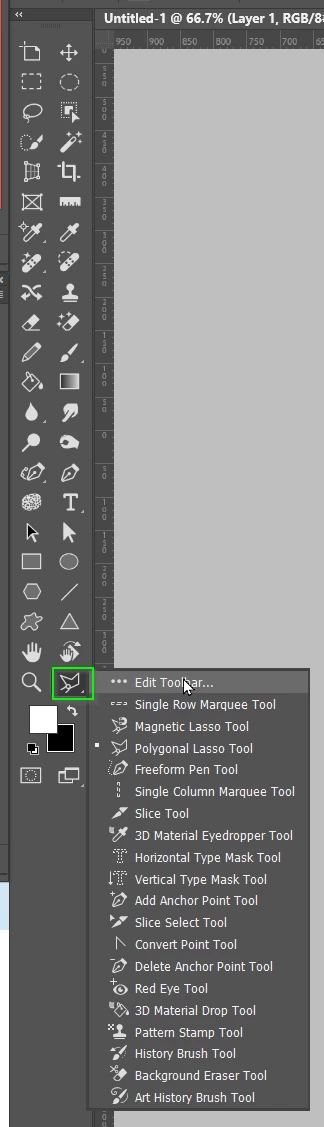
Click on the three dots at the bottom of the Toolbar, and then on Edit Toolbar.

The Remove tool will probably be there.  Drag it to the main toolbar and position it, and you'll be golden.

3 replies

Participant
January 23, 2024

I downloaded Photoshop 2024 and now the flyout menus for the Remove Tool and three other tools just under that are not working. In addition when opening Photoshop i get, "This Face Expression File is Bad or Corrupted". Another post said to search for the file and rename but i can not find the file on my computer. Thanks for any help.


Ged_Traynor
Community Expert
Community Expert
October 2, 2023

@bazz405 also check which workspace you're using, it might be something other than essentials

bazz405Author
Participant
October 5, 2023

Thanks for the help - I found it in tools and added it back. And good to know about the Workspace option! Would have replied sooner but for some reason all the replies went to my spam folder. 

Trevor.Dennis
Community Expert
Trevor.DennisCommunity ExpertCorrect answer
Community Expert
October 2, 2023

Click on the three dots at the bottom of the Toolbar, and then on Edit Toolbar.

The Remove tool will probably be there.  Drag it to the main toolbar and position it, and you'll be golden.