

ianbutty
Known Participant
January 16, 2017
Answered

Removing items from Photoshop recent files list

  • January 16, 2017
  • 5 replies
  • 32112 views

The thumbnail view of recent files in PS CC is really useful, but I have just hit a problem.

My main area of work is teaching and training other photographers.  I teach all types of genres, from simple beginner level photography to more advanced topics such as art nude photography.

As part of my training sessions, I often bring up images in photoshop.  For the first time, I have someone under 18 attending my beginner level photography course.  For obvious reasons I want to remove any art nude images from the recent files shown when photoshop starts, but cannot find any way to do this.

I have seen elsewhere people advising deletion of the actual image file - I don't want to do this as the art nude files need to be where they are for when I am teaching on those topics I just want to remove them from the recent files list.

Thanks

Ian.
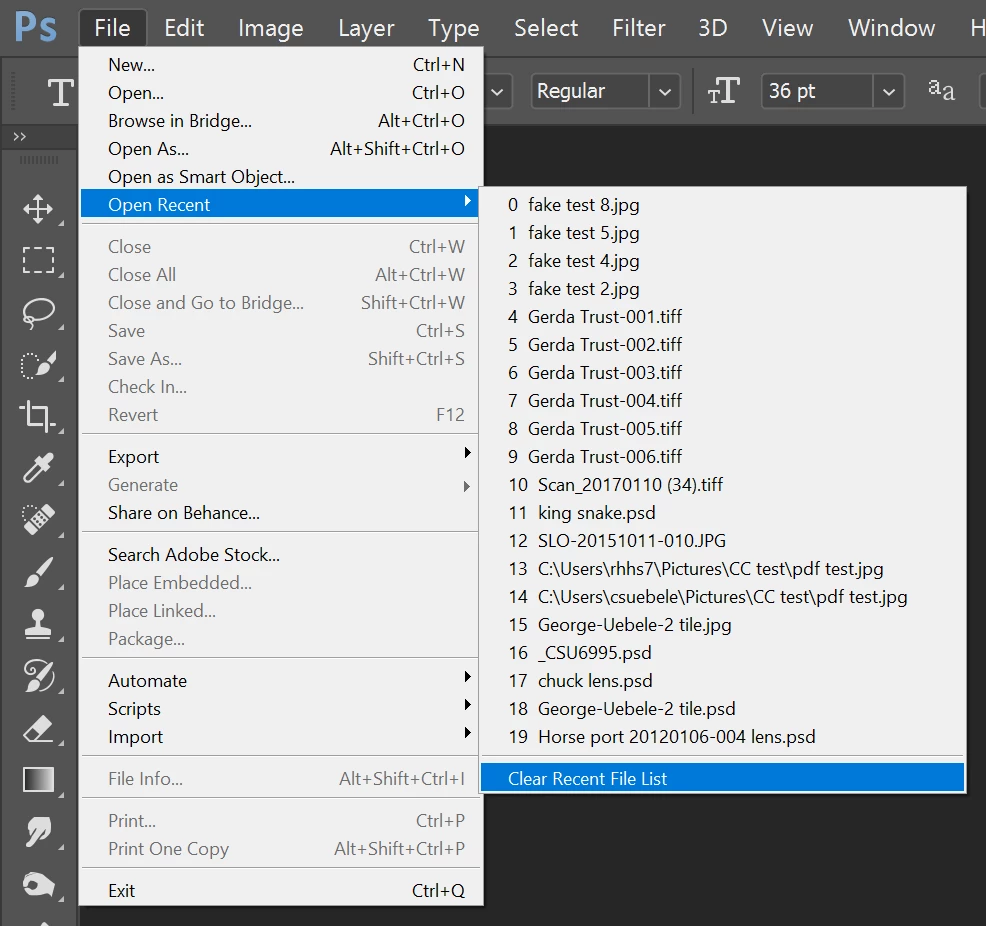
Correct answer Chuck Uebele

As far as I know, you can only clear the entire list. You might want to do that then populate it with images for your class by just opening them.

5 replies

Participant
June 18, 2023

This can be done through the registry editor. Make sure you have photoshop closed. Go to this key in the RegEditor: \HKEY_CURRENT_USER\Software\Adobe\MediaBrowser\MRU\Photoshop\FileList and you will find all of your recent files. You can delete what you don't want to see and leave what you want. Then when you bring up photoshop, it will have the list at this key. 

Make sure you have photoshop closed and no instance of it running in the background, when you do this procedure. Do not  mess what anything else in the registry, bc you may mess up Windows or other apps.

Participant
September 24, 2020

Thank You very much

Fhantum
Participating Frequently
January 16, 2017

This link has a quick explanation of how to do exactly what you want:

http://www.essential-photoshop-elements.com/remove-recently-edited-files.html

Trevor.Dennis
Community Expert
Community Expert
January 16, 2017

Fhantum wrote:

This link has a quick explanation of how to do exactly what you want:

http://www.essential-photoshop-elements.com/remove-recently-edited-files.html

That link tells you how to temporally hide the recent files, but not how to remove one or more particular files from the list. 

The only workarounds I can think of is to clear the list.  Then have all the files you want to repopulate the list with in a single folder. Select them all and open them all.  Then close them all *Ctrl Alt w'  and click on apply to all when you say not to save them.

The other workaround is to set the recent files view to list instead of thumbnails.

Let us know if you make a request for this feature on the Feedback site, as I would add my support for it.

KJerryK
Legend
February 24, 2017

I'd support it too. For now the easiest way I've found is to slightly change the file name, click on it in the recent list so it is removed, and then change it back.

January 16, 2017

One thing I have found is that if you move a file to a different location then click it in the recent file list next time you run PS it will say not found then remove only that entry.

Not sure if there is some work around that could be achieved with this but chances are you would have to move the images in question to a different location every time you were finished which isn't exactly ideal. I suppose if you kept all the images in one folder you could just drag drop it somewhere else each time you were finished (even if you just kept moving it back and forth) which is faster than having to open all the images you don't want to remove without having the benefit of recent files. If that makes sense

Participant
May 16, 2020

Exactly what I neesed : Delete specific files from the Photoshop recent files list

.
As an example, not that I'm prude, I wouldn't want to open Photoshop in front of a friend or a kid, having nude photos in this list.


The solution you propose seems the best alternative, thank you for that HothWampa

Still, I'm surprised to see that Adobe simply did not add a delete option from the context menu.

Chuck Uebele
Community Expert
Chuck UebeleCommunity ExpertCorrect answer
Community Expert
January 16, 2017

As far as I know, you can only clear the entire list. You might want to do that then populate it with images for your class by just opening them.

ianbutty
ianbuttyAuthor
Known Participant
January 16, 2017

Thanks Chuck.  Looks like I will have to do that.

If Adobe is reading this - please can you consider adding a right click on the recent thumbnail with the option to remove that file from the recent list.  That's what Windows 10 does with its list.