
Known Participant
December 27, 2016
Question

Removing reflections in Eyes

  • December 27, 2016
  • 3 replies
  • 11718 views

Hi,

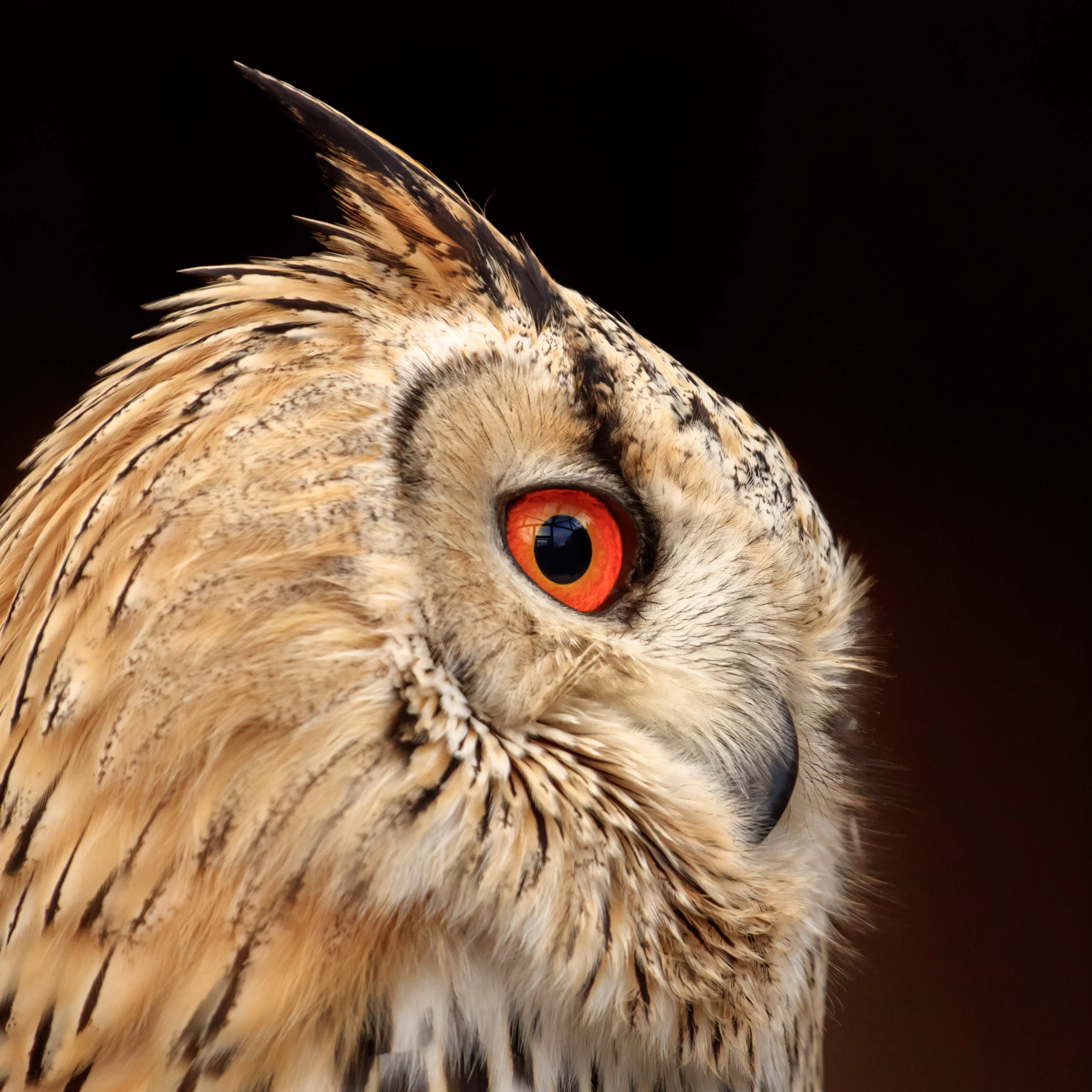
I took this photo of an owl yesterday. I really like it but the reflections in the Eye are irritating.

I already tried stamping them away but the result wasn't satisfactory.

There must be better ways.

Any suggestions?

Greetings,

David
    This topic has been closed for replies.

    3 replies

    D Fosse
    Community Expert
    Community Expert
    December 27, 2016

    If you want to conceal the cage-like structure seen in the reflection, that's fair enough. But don't remove the reflection altogether! It'll just look dead and artificial.

    If this was me I'd just paint it out on a new layer (leaving as much as possible of the original) - and then maybe add a little noise to make it blend naturally.

    Nghia_Ng20
    Participant
    March 1, 2021

    Hello,

    Would you mind providing a step-by-step practice to achieve that outcome?

    Thank you so much for your help!!

    Nghia

    Trevor.Dennis
    Community Expert
    Community Expert
    December 27, 2016

    I'm guessing that you are going to be a photographic purist, and not like this, but greatest joy is doing stuff from scratch with Photoshop, and the second eye below is pure illustration.

    Make a layer and drag out a selection a bit bigger than the eye.

    Sample background and foreground colours from the two shades of orange in the eye, and Render Clouds.

    I also gave it some Distort > Twirl.

    Drag out an ellipse to cover the pupil, and fill a new layer with black.

    Use layer style and give it a soft layer & emboss, and yellow outer glow.

    Make a clipping path of the outline of the eye

    Ctrl click your clipping path to load as selection, and add a layer mask to the orange clouds

    Unlink the layer mask, and move the orange into position.

    Use a black irregular shaped brush to distress the outline.

    Time for bed.

    davescm
    Community Expert
    Community Expert
    December 27, 2016

    Hi

    I took your image and put it on new layer and flipped it vertically. I then then moved and masked it so the bottom of the eye was used to cover the top. There was a tiny bit left which I addressed with the clone tool.

    However if you take all reflections out it loses the glassiness of the eye

    So I painted back in a simpler reflection on a new layer, which gives a bit of life to the eye

    Hope that helps

    Dave