
Removing traffic with Mean Stacking no longer working as expected
Hello all,
I'm having a new issue with removing moving objects - I'm a commercial photographer, and often need to manage traffic and pedestrians when photographing building exteriors. The standard method of stacking, aligning, converting to Smart Object, then setting stack mode to Mean, has worked for years. For some reason in recent months, it has stopped.
Now, instead of behaving as expected and removing the moving/changing items, it's blending the images and the moving objects are appearing in all locations. For example, a pedestrian is walking in front of the building, I'll take 2 images with them in different spots, and now using this method, it brings out BOTH locations with each one just faded/ghosted a little.
It does this regardless of using the above multi-step method, or using the automated Statistics method, and regardless of choice of stacking & aligning method, or using Mean or Median, or 8 or 16 bit, and regardless of whether coming in from Lr or opening directly in Ps.
Any idea why this is no longer working? Is there a simple setting somewhere that I've missed that's been changed in recent updates?
Here's a screen cap of the result:
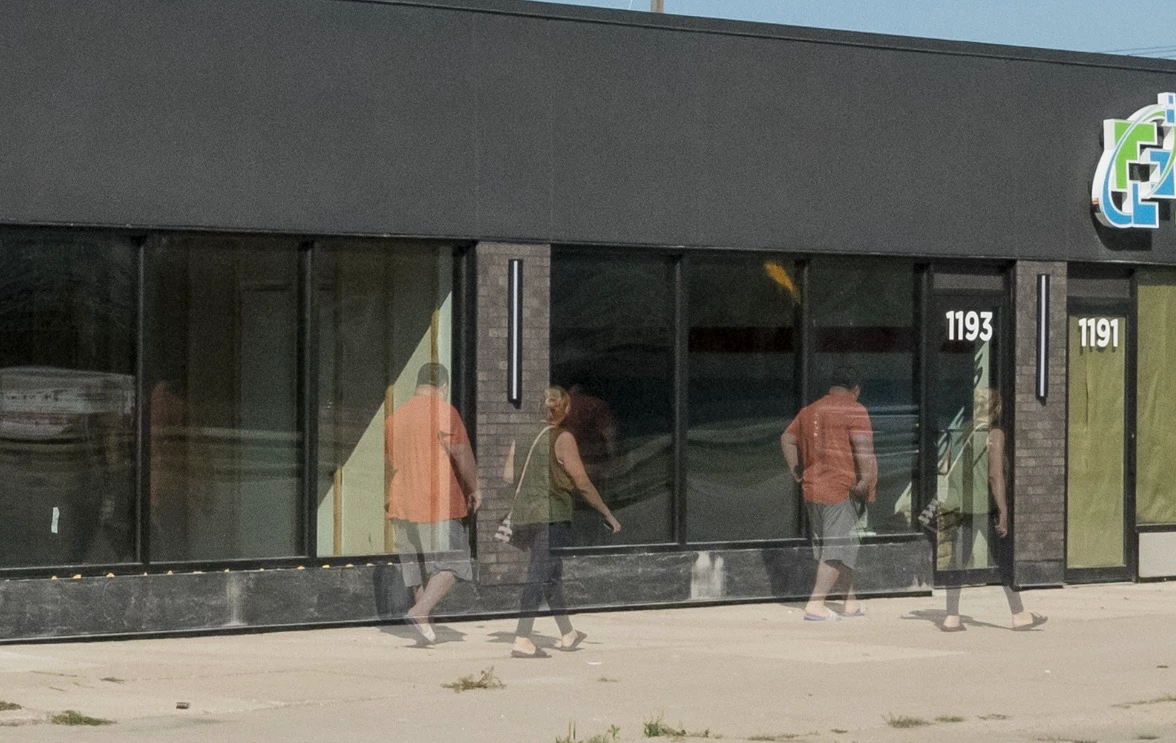
Thanks!
 AdChoices