
Participating Frequently
November 7, 2023
Answered

Renaming multiple artboards/layers, specifically removing the word copy.

  • November 7, 2023
  • 3 replies
  • 3990 views

Hi all, 

So I'm wondering if there's a script or plugin that would allow me to bulk edit layer names and artboard names, even if it's round-tripping out to a file I edit in notepad. 

Here's my scenario, I work with multple artboards for advertising and usually use an existing artboard spread to start. So being able to rename all the boards to the new campaign would be super handy. 


Also when building a multi-variat campaign, I'll drag a copy of all the selected artboards over, but this adds "copy" and then "copy copy" or "copy2" Ideally it would be great if I could just have a list of the artboards, do the whole find and replace thing and maybe make tweaks to the layer names if need be. 

There's probably a script or plugin for this, I doubt this is a scenario that hasn't played out for someone else, it would be a big time-saver for me. 


Thanks
-S 
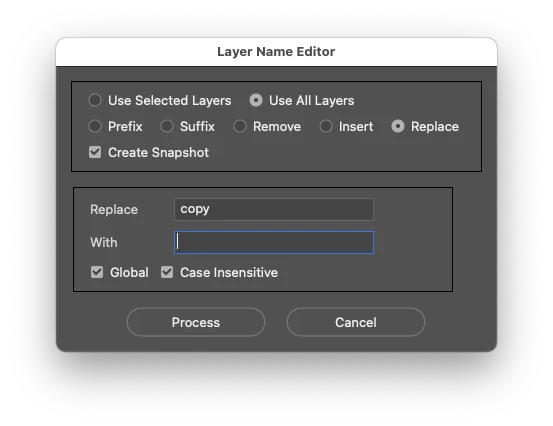
Correct answer Stephen Marsh

The following script has served me well for many years:


https://github.com/Paul-Riggott/PS-Scripts/blob/master/Layer%20Name%20Edit.jsx


You can change the dialog colour from:


var myBrush = g.newBrush(g.BrushType.SOLID_COLOR, [0.99, 0.99, 0.99, 1]);


To:


var myBrush = g.newBrush(g.BrushType.THEME_COLOR, "appDialogBackground");


3 replies

Stephen Marsh
Community Expert
Community Expert
November 8, 2023
quote

Also when building a multi-variat campaign, I'll drag a copy of all the selected artboards over, but this adds "copy" and then "copy copy" or "copy2" Ideally it would be great if I could just have a list of the artboards, do the whole find and replace thing and maybe make tweaks to the layer names if need be. 


By @GhostPROD


You will need to rename existing layers, but for new layers - double check the layers panel menu, panel options: "Add copy to copied layers and groups" and untick it.

GhostPRODAuthor
Participating Frequently
November 8, 2023

Awesome thanks a lot for this, this will help a lot in the future. 

Stephen Marsh
Community Expert
Stephen MarshCommunity ExpertCorrect answer
Community Expert
November 7, 2023

The following script has served me well for many years:


https://github.com/Paul-Riggott/PS-Scripts/blob/master/Layer%20Name%20Edit.jsx


You can change the dialog colour from:


var myBrush = g.newBrush(g.BrushType.SOLID_COLOR, [0.99, 0.99, 0.99, 1]);


To:


var myBrush = g.newBrush(g.BrushType.THEME_COLOR, "appDialogBackground");


GhostPRODAuthor
Participating Frequently
November 8, 2023

I can definitely use this in my workflow. 

Stephen Marsh
Community Expert
Community Expert
November 8, 2023

@GhostPROD 


Please remember to come back and mark the replies that were the "correct answers".

GNDGN
Inspiring
November 7, 2023

Give this script a try:

var dialog = new Window("dialog");
dialog.text = "Layer Name Renamer";

var but1 = dialog.add("button", undefined, "Export layer names");
var but2 = dialog.add("button", undefined, "Rename layers");
var but3 = dialog.add("button", undefined, "Exit");

var doc = app.activeDocument;

var txtFile = File("/path/to/layerNames.txt");


function exportNames() {
	txtFile.open('w');

	for(i=0; i<doc.layers.length; i++) {
		txtFile.writeln(doc.layers[i].name);
		for(j=0; j<doc.layers[i].layers.length; j++) {
			txtFile.writeln(doc.layers[i].layers[j].name);
		}
	}

	alert("Layer names written to: " + txtFile);
}

function renameLayers() {
	txtFile.open('r');

	var layerNames = txtFile.read().split("\n");

	var c = 0;

	for(i=0; i<doc.layers.length; i++) {
		doc.layers[i].name = layerNames[c];
		c++;
		for(j=0; j<doc.layers[i].layers.length; j++) {
			doc.layers[i].layers[j].name = layerNames[c];
			c++;
		}
	}

	alert("Layers renamed");
}

function endScript() {
	dialog.close();
}


but1.onClick = exportNames;
but2.onClick = renameLayers;
but3.onClick = endScript;

dialog.show();


Before you execute the script, make sure to create an empty text file and update the path to it inside the script. The script writes all layer names into that file like this:

This is the corresponding Layers panel inside Photoshop:


After making adjustments to the individual lines inside the text file...

 ...and running the script again, the layer names get renamed as desired:


Make sure not to change the layer order inside Photoshop between exporting and renaming layer files via the script. Have fun.

____________________Robotic Process Automation in Desktop Publishing (Book): https://doi.org/10.1007/978-3-658-39375-5
GhostPRODAuthor
Participating Frequently
November 8, 2023

This is awesome, I'll give it a go. I've run  scripts in Illustrator a fair bit, Photoshop scripts are new territory for me.