
EMastermind
Participating Frequently
July 29, 2017
Question

Rendering Text Problem

  • July 29, 2017
  • 2 replies
  • 1019 views

Hi everybody.

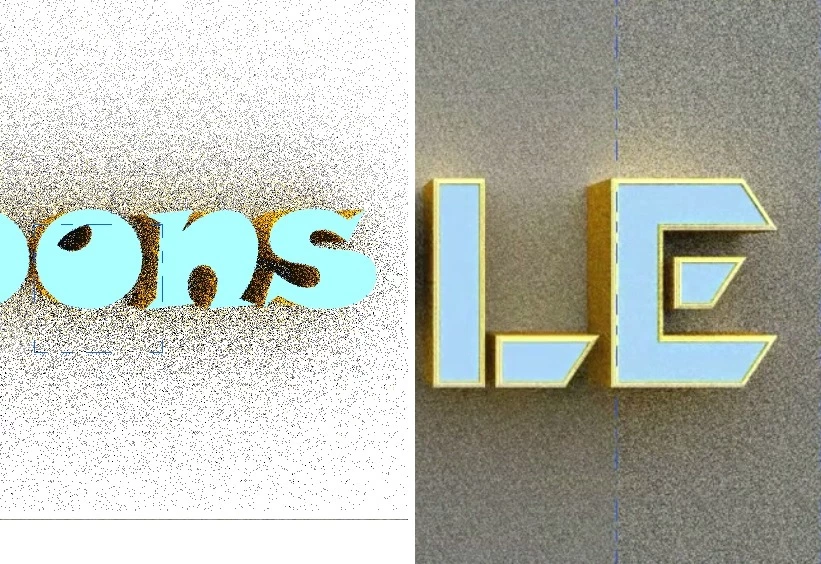
I tried to create some cool 3D text by using 3D option in Photoshop but I faced a problem.

The Right side picture is the text I created in Photoshop CS 6 (2012) and there were no problem.

But the Left side one is my work in Photoshop CC 2017. Both images are captured from the beginning of Render Process, But The one which is for CC 2017 remained noisy at the end and never got better that what you see in the picture.

I tried many ways but none of them helped me.

Please tell me if anyone knows a solution.

Thanks.
This topic has been closed for replies.

2 replies

Participant
July 10, 2020

I have same problem dear have you find the solution of it??


if any one have solution please help.

davescm
Community Expert
Community Expert
July 29, 2017

Hi

What are your 3D Render quality settings in Preferences?

The other difference - it looks like your background is white in one and grey in the other

If you want to put up a link to the PSD I will take a look at it for you

Dave

EMastermind
Participating Frequently
July 29, 2017

Thanks for responding.

This is my 3D settings

Both Backgrounds Were white... (the right one looks grey because it's for middle of the render)

What should I do?

davescm
Community Expert
Community Expert
July 29, 2017

Without seeing the rest of your settings particularly the lighting and materials then I would only be guessing.

Take a look at all your lighting : Global, IBL, Individual Lights such as infinite /spots etc and any illumination settings on the textures.

If you put up a link to your PSD(s) I'll take a look. But it may be in the morning (it's getting late here in the UK )

Dave