

Mohamed Hameed21513110
Inspiring
September 9, 2023
Answered

replace textlayer content with prompt search and change specific words colors

  • September 9, 2023
  • 3 replies
  • 1083 views

Greetings to everyone
I have this code but it has a problem

var searchWord = prompt("Enter the word to search for:", "", "Search Word");
var textColor = new SolidColor();
textColor.rgb.red = 255;
textColor.rgb.green = 0;
textColor.rgb.blue = 0;

var activeLayer = app.activeDocument.activeLayer;

if (activeLayer.kind === LayerKind.TEXT) {
  var textItem = activeLayer.textItem;
  var textContents = textItem.contents;
var txt = activeDocument.activeLayer.textItem.contents.toLowerCase(); // "blablablabla Sport blablablabla sport blablabla Sports";

var idx = [];
  var newTextContents = textContents.replace(new RegExp(searchWord, 'gi'),+ searchWord );
   //var idx = searchWord;
    for (var i = 0; i < searchWord.length; i++)
    searchWord[i].color = textColor;
  textItem.contents = newTextContents;
  //textItem.color = textColor;
}


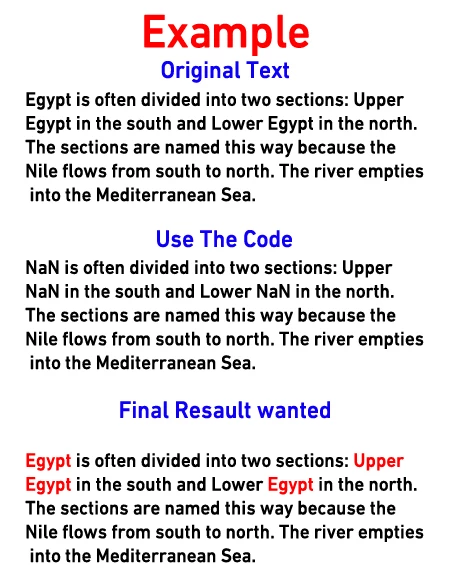
I search for a word within a text layer, but when I use the code, I see results (Nan)
I want to modify the code to show the search results and change the color of the search results words to red
This topic has been closed for replies.
Correct answer c.pfaffenbichler
@jazz-y posted code about changing some text color to another text color
and about changing each letter color randomly 
, maybe those can serve as examples. 
 
Edit: I noticed the second example would change other properties so it would probably not be of great help for you. 
 
Edit2: Changing specific words in a Type Layer to a specific color via Script is definitely possible, but my code seems decidedly clunky so far, maybe I will be able to think of a simpler manner. 
// typeLayerChangeColorOfSpefifiedWords.jsx
// apply color to specified words of selected type layer;
// 2023, use it at your own risk;
if (app.documents.length > 0) {
var theNewColor = [255,128,0];
var theRegeExp = /456/gi;
//////////////////
try {
var theRanges = new Array;
var theStyleRanges = new Array;
// get font of active layer;
var ref = new ActionReference();
ref.putEnumerated( charIDToTypeID("Lyr "), charIDToTypeID("Ordn"), charIDToTypeID("Trgt") ); 
var layerDesc = executeActionGet(ref);
var layerSet = typeIDToStringID(layerDesc.getEnumerationValue(stringIDToTypeID("layerSection")));
var isBackground = layerDesc.getBoolean(stringIDToTypeID("background"));
var theName = layerDesc.getString(stringIDToTypeID('name'));
// if not layer group collect values;
if (layerSet != "layerSectionEnd" && layerSet != "layerSectionStart" && isBackground != true) {
var hasText = layerDesc.hasKey(stringIDToTypeID("textKey"));
if (hasText == true) {
var textDesc = layerDesc.getObjectValue(stringIDToTypeID('textKey'));
var theText = textDesc.getString(stringIDToTypeID('textKey'));
// get indices for string;
var indicesCount = 0;
var theIndices = new Array;
var cnt = 0;
while ((result = theRegeExp.exec(theText))!=null) {
    theIndices.push([result.index, result.index+result[0].length, cnt])
};
// get properties;
var paragraphRangeList = textDesc.getList(stringIDToTypeID('paragraphStyleRange'));
var kernRange = textDesc.getList(stringIDToTypeID('kerningRange'));
var rangeList = textDesc.getList(stringIDToTypeID('textStyleRange'));
// process the list to get an array of styles and one array of the indices;
for (var o = 0; o < rangeList.count; o++) {
var thisList = rangeList.getObjectValue(o);
var theFrom = thisList.getInteger(stringIDToTypeID('from'));
var theTo = thisList.getInteger(stringIDToTypeID('to'));
var styleDesc = thisList.getObjectValue(stringIDToTypeID('textStyle'));
//////////////////
// add to array;
if (o == 0) {
    theRanges.push([theFrom, theTo]);
    theStyleRanges.push(styleDesc);
    };
if (o > 0 && theFrom != theRanges[theRanges.length - 1][0] /*&& theTo != theRanges[theRanges.length - 1][1]*/) {
theRanges.push([theFrom, theTo]);
theStyleRanges.push(thisList.getObjectValue(stringIDToTypeID('textStyle')));
};
//////////////////
}
}
};
// change text;
// =======================================================
var idTxtt = charIDToTypeID( "Txtt" );
var idFrom = charIDToTypeID( "From" );
var idT = charIDToTypeID( "T   " );
var idTxtS = charIDToTypeID( "TxtS" );
var idTxLr = charIDToTypeID( "TxLr" );
var idTxt = charIDToTypeID( "Txt " );
    var desc6 = new ActionDescriptor();
        var ref1 = new ActionReference();
        ref1.putEnumerated( idTxLr, charIDToTypeID( "Ordn" ), charIDToTypeID( "Trgt"  ));
    desc6.putReference( idnull = charIDToTypeID( "null" ), ref1 );
        var desc7 = new ActionDescriptor();
        desc7.putString( idTxt, theText );
            var list2 = new ActionList();
//////////////////
// define each letter individually;
var theIndex = 0;
var thisStyleRange = theStyleRanges[theIndex];
var originalColor = theStyleRanges[theIndex].getObjectValue(stringIDToTypeID('color'));
var thisRange = theRanges[theIndex];
var targetStart = theIndices[indicesCount][0];
var targetEnd = theIndices[indicesCount][1];
for (var m = 0; m < theText.length; m++) {
// check for relevant style range;
    if (m == thisRange[1]) {
        theIndex++;
        var thisStyleRange = theStyleRanges[theIndex];
        var originalColor = theStyleRanges[theIndex].getObjectValue(stringIDToTypeID('color'));
        var thisRange = theRanges[theIndex];
        };
// apply style range but change the color;
    var desc14 = new ActionDescriptor();
    desc14.putInteger( idFrom, m );
    desc14.putInteger( idT, m+1 );
        var desc15 = new ActionDescriptor();
        var desc15 = thisStyleRange;
        if (m >= targetStart && m < targetEnd) {
            var a1 = new ActionDescriptor();
            a1.putDouble(stringIDToTypeID('red'), theNewColor[0]);
            a1.putDouble(stringIDToTypeID('grain'), theNewColor[1]);
            a1.putDouble(stringIDToTypeID('blue'), theNewColor[2]);
            desc15.putObject(stringIDToTypeID('color'), stringIDToTypeID('RGBColor'), a1);
        } else {
            desc15.putObject(stringIDToTypeID('color'), stringIDToTypeID('RGBColor'), originalColor)
            if (m == targetEnd && indicesCount < theIndices.length-1) {
                indicesCount++;
                var targetStart = theIndices[indicesCount][0];
                var targetEnd = theIndices[indicesCount][1];
            }
        };
    desc14.putObject( idTxtS, idTxtS, desc15 );
    list2.putObject( idTxtt, desc14 );
    };
//////////////////
var desc7 = new ActionDescriptor();
var list3 = new ActionList();
    for (var n = kernRange.count-1; n >= 0; n--) {
        var thisOne = kernRange.getObjectValue(n);
        var desc15 = new ActionDescriptor();
        desc15.putInteger( idFrom, thisOne.getInteger(charIDToTypeID("From")) );
        desc15.putInteger( idT, thisOne.getInteger(charIDToTypeID( "T   " )) );
        desc15.putInteger( charIDToTypeID( "Krng" ), thisOne.getInteger(stringIDToTypeID("kerning")));
        list3.putObject( stringIDToTypeID( "kerningRange"),  desc15);
        };
        desc7.putList( idTxtt, list2 );
        desc7.putList( stringIDToTypeID( "kerningRange"), list3);
    desc6.putObject( idT, idTxLr, desc7 );
executeAction( charIDToTypeID( "setd" ), desc6, DialogModes.NO );
}
catch (e) {};
};

3 replies

c.pfaffenbichler
Community Expert
Community Expert
September 10, 2023

@Mohamed Hameed21513110 , I added code to my previous post, have you tested it yet? 

Mohamed Hameed21513110
Inspiring
September 10, 2023

@c.pfaffenbichler 
thank you for helping me

Excuse me sir
I put the code in and tried it, but I didn't understand how it worked

Please explain how the code works by changing the color of the selected words

c.pfaffenbichler
Community Expert
Community Expert
September 11, 2023
var theNewColor = [255,128,0];

defines the new color 

var theRegeExp = /456/gi;

definess the RegExp to be replaced. 


I checked with a Type Layer combining different fonts, sizes etc. and those seem to be maintained. 

c.pfaffenbichler
Community Expert
Community Expert
September 9, 2023

If I remember correctly DOM code did not use to be able to color individual words in a Type Layer so AM code needed to be used. 


Mohamed Hameed21513110
Inspiring
September 9, 2023

@c.pfaffenbichler 

quote

 so AM code needed to be used. 


If possible explain how this is done?

c.pfaffenbichler
Community Expert
Community Expert
September 9, 2023

Record changing the color of a word in a Type Layer with ScriptingListener.plugin and then clean up the resulting code and wrap in in a function that takes meaningful arguments. 

Legend
September 9, 2023

Why is the + sign needed here?


var newTextContents = textContents.replace(new RegExp(searchWord, 'gi'),+ searchWord );