Participant
June 8, 2022
Answered

Replacing an object with another object

  • June 8, 2022
  • 2 replies
  • 8606 views

Hi! Im trying (and failing) to Photoshop a Book into where the sheet of paper it. I would have to cut out the paper and make sure that the fingers are not cut of. Can someone give me a hand or a short explanation? 🙂

Correct answer TheOriginalGC

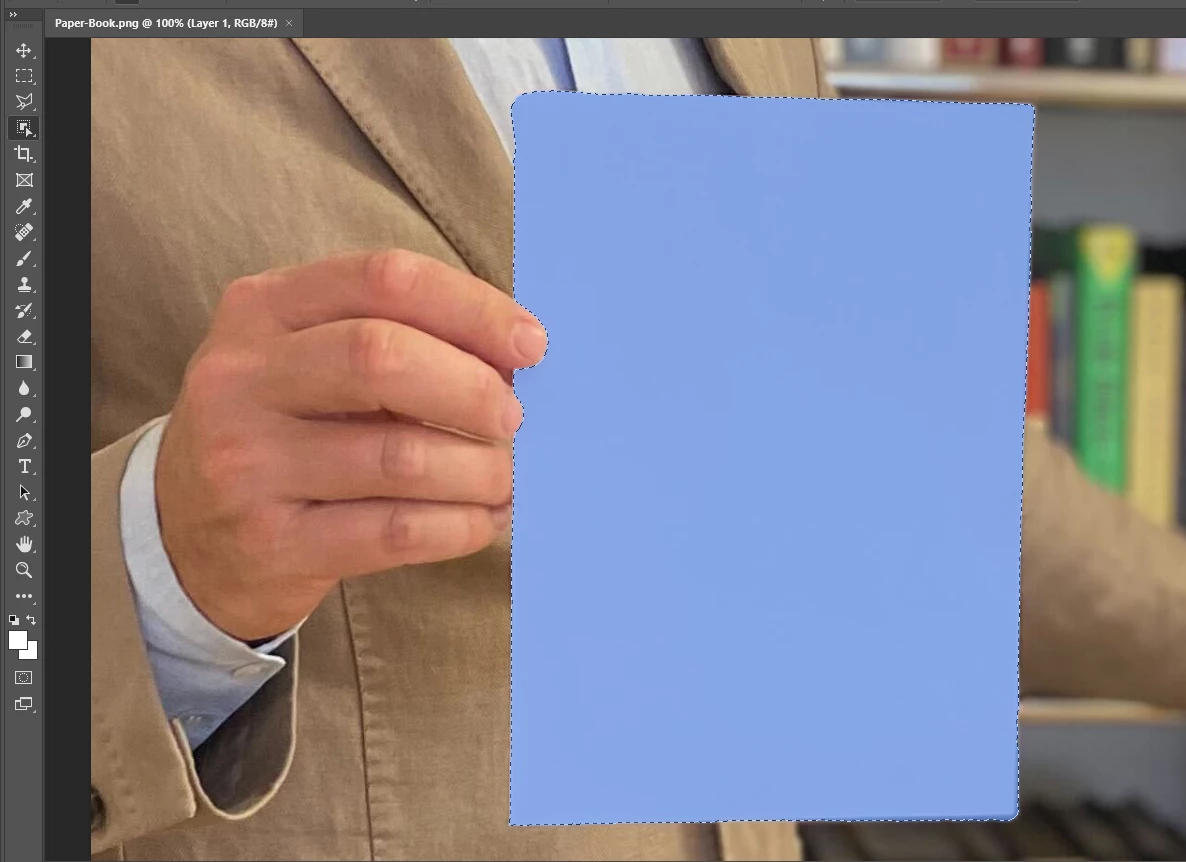
If I understand you correctly, then the quickest way is to use the object selection tool to select the paper as seen in the attached image. Then you can invert the selection to create a layer of the "hole" where the paper used to be and drop the book in behind that layer.
 

2 replies

c.pfaffenbichler
Community Expert
Community Expert
June 8, 2022

And to warp content to the page I would recommend using a Smart Object and free transform it accordingly. 

That way you can later on open the SO and insert new content if necessary and the distortion is applied. 

TheOriginalGC
Community Expert
TheOriginalGCCommunity ExpertCorrect answer
Community Expert
June 8, 2022

If I understand you correctly, then the quickest way is to use the object selection tool to select the paper as seen in the attached image. Then you can invert the selection to create a layer of the "hole" where the paper used to be and drop the book in behind that layer.


Participant
June 8, 2022

Thats for the quick reply! The first step works. Can you send me some more details on the second part (Then you can invert the selection to create a layer of the "hole" where the paper used to be and drop the book in behind that layer.). Sorry, I'm pretty new to this and still learning every day 🙂 

Participant
June 8, 2022

OK wait, I got it. Thanks again!
