
kathryn ar49399477
Participant
June 4, 2018
Answered

Replacing color

  • June 4, 2018
  • 3 replies
  • 2151 views

I have a simple question... know I have done it before but cannot for the life of me remember how (aging old lady)... I have a simple black line drawing - all black ink - and I need to change the black color of the whole drawing to red. I have spent several hours reading tutorials, but they are all for replacing color in photos. I can't select and then use the paint bucket because the drawing is not solid, rather sketchy. I have spent time trying to use the color replacement tool, but the color doesn't replace... sigh. Appreciate a little help.
    This topic has been closed for replies.
    Correct answer davescm

    Hi

    This can be done without any masking

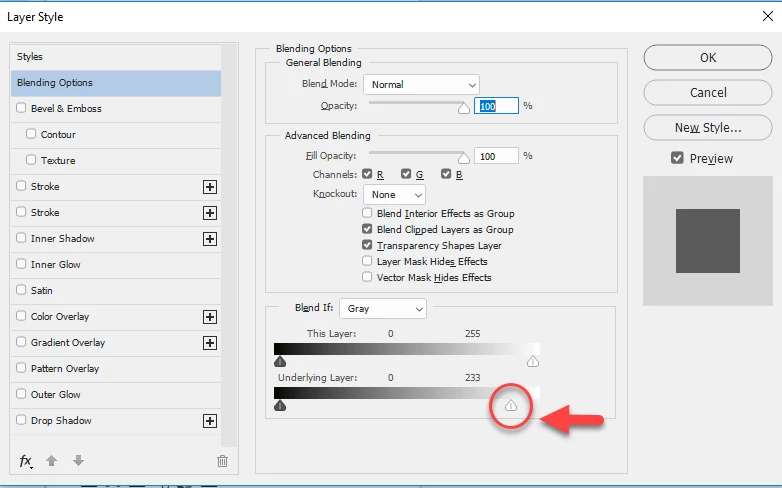
    1. Add a solid red color fill layer (Layer > New Fill Layer > Solid Color) above your drawing layer. Yyou can choose the red color or alter it later)

    2. Right click on the color fill layer and choose Blending options

    3. In the dialogue that opens move the "Blend If Underlying layer" slider arrowed below to the left slightly

    Dave

    3 replies

    Bojan Živković11378569
    Community Expert
    Community Expert
    June 4, 2018

    If you have a black line drawing on the solid white color background then do the following:

    • Go to Layer > New Adjustments Layer > Hue/Saturation
    • Check Colorize
    • Type 50 in the text box for Lightness
    • Play with Hue as needed and increase Saturation as needed.

    DelphiZoa
    Participating Frequently
    June 4, 2018

    Is the black on it's own layer or is it on a background (white or otherwise)? If possible, can you post a screenshot of the drawing? I ask, because it will help us determine the easiest and most effective way to alter the color.

    kathryn ar49399477
    Participant
    June 4, 2018

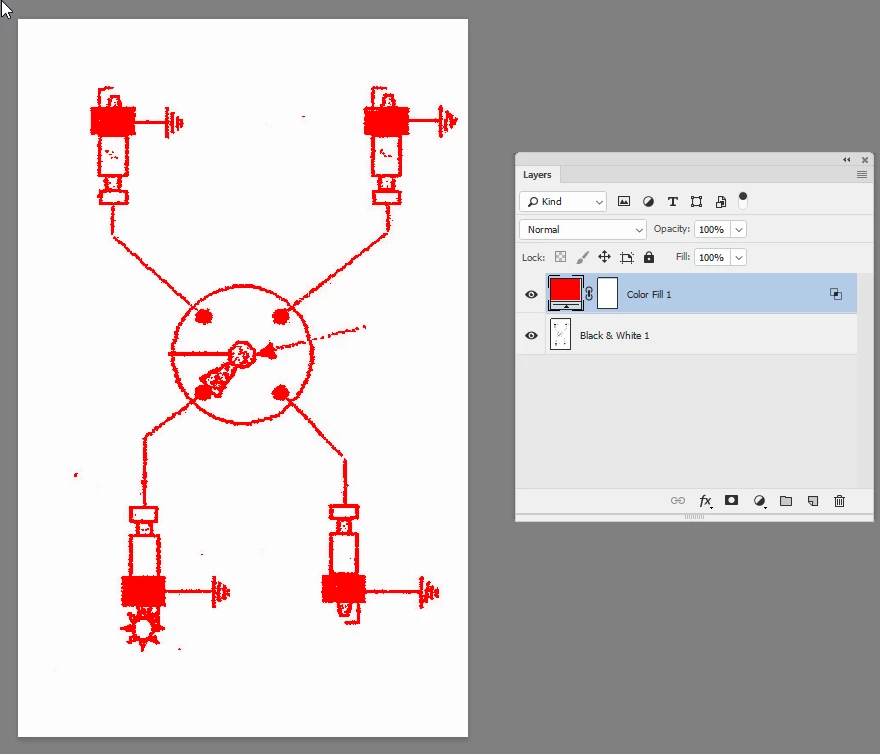
    I finally did what I usually do, figured out a work-around that satisfied my husband who wanted this part of his wiring diagram to be in red. I used the color replacement tool and went over the black to give me enough red that it works. I also used the magic wand and the paint bucket for the larger areas that needed to be turned red. Again though, I figure there must be a way to turn all of the black to red…

    In the screen shot I show half of the image done with this method.

    c.pfaffenbichler
    Community Expert
    Community Expert
    June 4, 2018

    I would recommend

    • load the best channel as a Selection (by cmd-clicking it in the Channels Panel)

    • Selection > Invert

    • Layers > New Fill Layer > Solid Color and select the intended Color

    • add another, white Solid Color Layer beneath that

    Alternatively one could also apply the Mask to a Group, in which one can add and individually mask additional Solid Color Layers.

    Eugenio.NYC
    Participating Frequently
    June 4, 2018

    Hi There, Many ways to do that, something simple, open the Hue and Saturation and change this values

    Let me know if that works or upload your example

    Regards

    E