
Participant
February 4, 2018
Answered

Resetting layer mask defaults

  • February 4, 2018
  • 2 replies
  • 5504 views

When I create a layer mask from a selection, the values seem reversed: black reveals and white conceals. I can invert the selection to make the mask do what I want, but how do I restore the defaults so that "white reveals, black conceals" consistently once again? I'm using Photoshop CC 2017 on a Mac. Thanks.
    This topic has been closed for replies.
    Correct answer JJMack

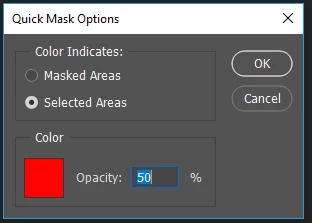
    Target the layer mask a usr CMD+I Invert. You may have inverted it to begin with  by hitting the option key when adding the mask or inverting the selection. If you use quick mask to create the selection make sure you did not change its default settings. I often changed quick mask operation though with the availability of the quick selection tool I do not use quick mask often these days.  If I ever start using CC 2018 Select object might be useful in some cases. I often select what I do not want to select then invert the selection I made.

    2 replies

    JoeLib
    Participating Frequently
    February 4, 2018

    If JJMack's solution doesn't work try this.

    After you make the selection, click [Select and Mask]  on the context menu at top of screen to open Properties.

    In the Properties box click INVERT and then below that check the box for Remember Settings.

    Joe

    Participant
    February 4, 2018

    Thanks, Joe, for your suggestion as well. I was not aware how to change and remember these settings. Good information! Thanks.

    JJMack
    Community Expert
    JJMackCommunity ExpertCorrect answer
    Community Expert
    February 4, 2018

    Target the layer mask a usr CMD+I Invert. You may have inverted it to begin with  by hitting the option key when adding the mask or inverting the selection. If you use quick mask to create the selection make sure you did not change its default settings. I often changed quick mask operation though with the availability of the quick selection tool I do not use quick mask often these days.  If I ever start using CC 2018 Select object might be useful in some cases. I often select what I do not want to select then invert the selection I made.

    JJMack
    Participant
    February 4, 2018

    Thanks, JJMack. I think I probably did change the Quick Mask defaults (some time ago). I appreciate your quick reply.