
April 6, 2017
Answered

Resetting preferences not working!!

  • April 6, 2017
  • 2 replies
  • 3379 views

I have Photoshop CS6 on a macbook. I must have pushed a weird combination of buttons or something because my paint brush and bucket don't paint the color that I choose. It will start to paint the color I choose and then if it runs over something already in the image, it changes to bright neon colors? Also when I paint, the stroke/fill isn't completely opaque although the opacity is set to 100%. Super frustrating!

I looked up tutorials on how to reset preferences by closing photoshop and then clicking control+alt+shift and then right clicking on the icon to start it but it only says "open, show recents and options" but when I click open, the videos say it should tell me to delete previous preferences but photoshop just opens as normal. HELP!?
This topic has been closed for replies.
Correct answer Norman Sanders

Opacity  at 100% ?

2 replies

Norman Sanders
Legend
April 6, 2017

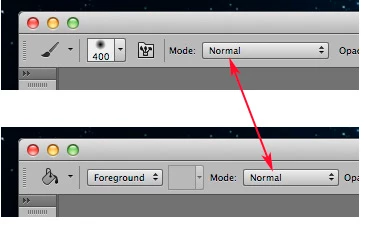
One more thing: make sure the Mode in the Options bar is set to Normal

April 6, 2017

I'm not sure where you're talking about? Is the mode in options bar in photoshop?

Norman Sanders
Norman SandersCorrect answer
Legend
April 6, 2017

Opacity  at 100% ?

Trevor.Dennis
Community Expert
Community Expert
April 6, 2017

Hi Jenak

You have to be really quick with the Opt Cmd Shift after starting Photoshop.  You should see a tiny dialog window asking to confirm resetting Preferences.  If you don't see it, then you probably were not quick enough.

There might also be an issue with Preferences.  Look at item #13 in this guide

http://blogs.adobe.com/crawlspace/2012/07/photoshop-basic-troubleshooting-steps-to-fix-most-issues.html

However, before you reset Preferences, can you paste a screen shot of your Photoshop workspace showing the layers panel with the layer you are trying to fill selected, and the paint bucket tool selected.  Just copy to clipboard, and paste here with Cmd v

April 6, 2017

Thanks for your suggestions. do you see how my color selected is a dark green? When I click to fill in that lighter green section it still gives me light green. Also all of the red and orange/bright yellow are results of trying to paint white with the paintbrush?