preditorj40153117
Inspiring
June 8, 2017
Question

Resetting The Brush Problem - Episode 2

  • June 8, 2017
  • 1 reply
  • 343 views

Second Time Issue

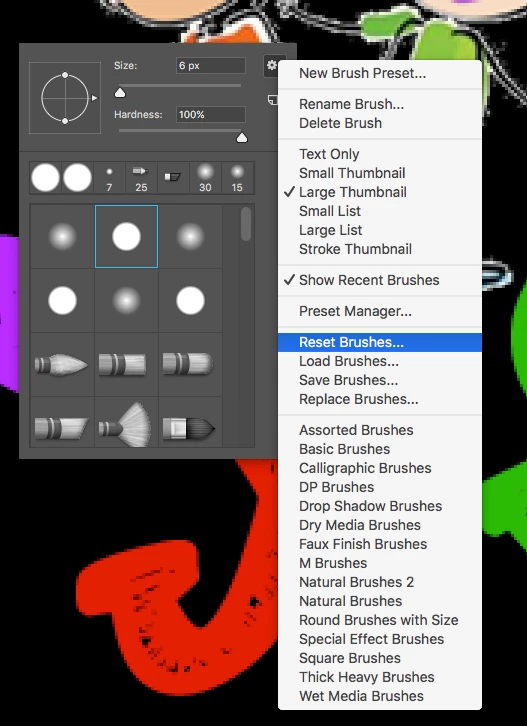
OK. My Brushes will not reset. It always has a feather thru about 20 projects now. This feather stays even after a brush reset. I really need a hard edge for the cartoon you can see in the background. I am trying to repair it for blackBG. Its a high level of detailed restoration.

It almost like the feather is increasing as I go. I reset it before all projects but it still persists.

The first time I posted this I still could never get a clean hard brush.

What ta do?
    This topic has been closed for replies.

    1 reply

    preditorj40153117
    Inspiring
    June 8, 2017

    Oh, It takes about 20 clicks to get to 0.000 opacity. That on a cluster of say 10 pixels left around the edges after you have used the magic eraser to knock out most of the background. If I place an image, raster the sane is true, 20-ish clicks to get zero opacity.

    Is there a cache to be cleared?

    Known Participant
    June 8, 2017

    To restore preferences quickly using a keyboard shortcut: Press and hold Alt+Control+Shift (Windows) or Option+Command+Shift (Mac OS) as you start Photoshop. You are prompted to delete the current settings. The new preferences files are created the next time you start Photoshop.

    preditorj40153117
    Inspiring
    June 8, 2017

    @Janet L Stoppee

    So after this techniqueI do get a clean edge but also it seems to be a few pixels creating a hard fall-off area around this clean eraser hit. The pic shows the clean cut out and I created a circle around that area to show what I see when using the tool.

    Not sure if this is normal but I can deal with it even if it is. Its a lot better than clicking 20x.