
gtsolid
Known Participant
January 9, 2021
Answered

Resize shorter side

  • January 9, 2021
  • 2 replies
  • 1317 views

Hi,

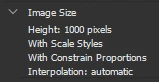
I created an action in which i resize the height to 1000 px. 

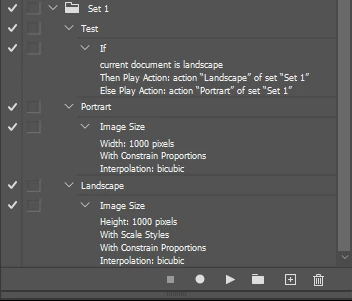
the problem is that some picture are portraits so i'd like to define a rule resizing the shorter edge to 1000 px. Is it possible?

 

This topic has been closed for replies.
Correct answer JJMack

That seems like a strange thing you want to do usually users users want an image to have the larger side be some length and the use Adobe Plug-in Script Fit Image menu  File>Automate>Fit Image... and would set 1000 width and height.     Making an image shorter size 1000 with a constrained image resize could make the other side huge.    The image's aspect ration does not change the other side will still be larger
 

2 replies

JJMack
Community Expert
JJMackCommunity ExpertCorrect answer
Community Expert
January 9, 2021

That seems like a strange thing you want to do usually users users want an image to have the larger side be some length and the use Adobe Plug-in Script Fit Image menu  File>Automate>Fit Image... and would set 1000 width and height.     Making an image shorter size 1000 with a constrained image resize could make the other side huge.    The image's aspect ration does not change the other side will still be larger


JJMack
gtsolid
gtsolidAuthor
Known Participant
January 9, 2021

I've found "Fit image" but it's grayed out if I don't have any image opened. So I think I can use it only for one picture at a time?

Stephen Marsh
Community Expert
Community Expert
January 9, 2021

Yes, you need an open image for fit image. When recording the fit image settings into an action, you can just create a new blank tempory file to work on that is larger than the target size, then record the fit image using 1000 x 1000 px and stop recording. You can then close the new temporary file without saving. Now when you playback the action it will use the recorded fit image valuess. You can then use the file > automate > batch command or the image processor script to apply the action to multiple images.

Chuck Uebele
Community Expert
Community Expert
January 9, 2021

I believe you can use a conditional statement in the action what determines if the image is portrait or landscape.