





Question
Resize Smart Object via Selectable Interpolation Method Script
Inspiration for the following script from the following idea/feature request (currently locked):
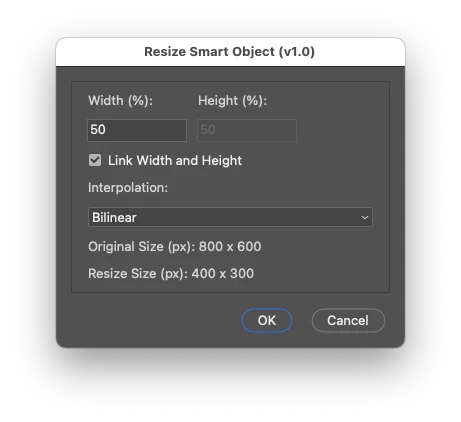
It's a pretty basic v1.0 release at the moment. It only works to resize by %, however, the original and resized values in pixels are displayed. The resize anchor point is defaulted to the middle-centre (this can be changed in the code).
/*
Resize Smart Object via Selectable Interpolation scriptUI GUI.jsx
v1.0 - 29th September 2024, Stephen Marsh
https://community.adobe.com/t5/photoshop-ecosystem-discussions/resize-smart-object-via-selectable-interpolation-method-script/m-p/14887508
Inspiration from:
https://community.adobe.com/t5/photoshop-ecosystem-ideas/p-ability-to-choose-a-smart-object-s-interpolation-method-2013/idi-p/12249327
Added a GUI as the original script had issues with the simple interactive transform in v2024 (25.12.0):
https://community.adobe.com/t5/photoshop-ecosystem-bugs/action-manager-transform-bug-dialogmodes-all-v25-12-0/idi-p/14884361
*/

#target photoshop

// Check if there's an active document
if (app.documents.length > 0) {

    // Get and set the ruler units
    var savedRuler = app.preferences.rulerUnits;
    app.preferences.rulerUnits = Units.PIXELS;

    var activeDocument = app.activeDocument;
    var activeLayer = activeDocument.activeLayer;

    // Check if the active layer is a smart object
    if (activeLayer.kind === LayerKind.SMARTOBJECT) {

        // Store the original visibility state of the layer
        var originalVisibility = activeLayer.visible;

        // Make the layer visible if it's currently invisible
        if (!originalVisibility) {
            activeLayer.visible = true;
        }

        // Get original layer bounds in pixels using UnitValue
        var originalBounds = activeLayer.bounds;
        var originalWidth = new UnitValue(originalBounds[2].value - originalBounds[0].value, "px"); // Right - Left
        var originalHeight = new UnitValue(originalBounds[1].value - originalBounds[3].value, "px"); // Top - Bottom

        // Ensure height is calculated correctly
        if (originalHeight.value < 0) {
            originalHeight = new UnitValue(-originalHeight.value, "px"); // Convert to positive if negative
        }

        // Store the original interpolation method
        var originalInterpolation = app.preferences.interpolation;

        // Create ScriptUI dialog
        var dialog = new Window("dialog", "Resize Smart Object (v1.0)");

        // Create a panel to group all content except buttons
        var contentPanel = dialog.add("panel");
        contentPanel.alignChildren = "left";

        // Create group for width and height fields
        var sizeGroup = contentPanel.add("group");
        sizeGroup.orientation = "row";

        // Width column
        var widthGroup = sizeGroup.add("group");
        widthGroup.orientation = "column";
        widthGroup.add("statictext", undefined, "Width (%):").alignment = "left";
        var widthInput = widthGroup.add("editnumber", undefined, "100");
        widthInput.characters = 10;

        // Height column
        var heightGroup = sizeGroup.add("group");
        heightGroup.orientation = "column";
        heightGroup.add("statictext", undefined, "Height (%):").alignment = "left";
        var heightInput = heightGroup.add("editnumber", undefined, "100");
        heightInput.characters = 10;

        // Checkbox for linking width and height
        var linkCheckbox = contentPanel.add("checkbox", undefined, "Link Width and Height");
        linkCheckbox.value = true; // Initially checked

        // Interpolation dropdown
        contentPanel.add("statictext", undefined, "Interpolation:").alignment = "left";
        var interpolationDropdown = contentPanel.add("dropdownlist", undefined, [
            "Bicubic (best for smooth gradients)", "Bicubic Automatic", "Bicubic Sharper (best for reduction)", "Bicubic Smoother (best for enlargement)",
            "Bilinear", "Nearest Neighbor (preserve hard edges)", "Preferences Setting"
        ]);
        interpolationDropdown.selection = 4; // Default to Bilinear

        // Original size display
        contentPanel.add("statictext", undefined, "Original Size (px): " + Math.round(originalWidth.value) + " x " + Math.round(originalHeight.value));

        // Resize size display
        var resizeDisplay = contentPanel.add("statictext", undefined, "Resize Size (px): 0 x 0");

        // Update the height when width is modified (and vice versa) if checkbox is checked
        function syncFields(source, target) {
            if (linkCheckbox.value) {
                target.text = source.text;
                updateResizeDisplay();
            }
        }

        function updateResizeDisplay() {
            var widthValue = parseFloat(widthInput.text);
            var heightValue = parseFloat(heightInput.text);
            var newWidth = new UnitValue((originalWidth.value * widthValue) / 100, "px");
            var newHeight = new UnitValue((originalHeight.value * heightValue) / 100, "px");
            resizeDisplay.text = "Resize Size (px): " + Math.round(newWidth.value) + " x " + Math.round(newHeight.value);
        }

        widthInput.onChange = function () {
            syncFields(widthInput, heightInput);
            updateResizeDisplay();
        };

        heightInput.onChange = function () {
            syncFields(heightInput, widthInput);
            updateResizeDisplay();
        };

        // Disable or enable the height field based on the checkbox state
        function updateHeightFieldState() {
            if (linkCheckbox.value) {
                heightInput.enabled = false; // Disable height input
                heightInput.text = widthInput.text; // Update visually
                updateResizeDisplay(); // Update resize display
            } else {
                heightInput.enabled = true; // Enable height input
            }
        }

        linkCheckbox.onClick = updateHeightFieldState;

        // Initial state check
        updateHeightFieldState();

        // Add OK and Cancel buttons
        var buttonGroup = dialog.add("group");
        buttonGroup.alignment = "right";

        var okButton = buttonGroup.add("button", undefined, "OK", {
            name: "ok"
        });
        var cancelButton = buttonGroup.add("button", undefined, "Cancel", {
            name: "cancel"
        });

        // Add button event logic
        cancelButton.onClick = function () {
            dialog.close();
        };

        okButton.onClick = function () {
            var widthValue = parseFloat(widthInput.text);
            var heightValue = parseFloat(heightInput.text);

            // Check if both width and height are 100
            if (widthValue >= 100 && heightValue >= 100) {
                alert("Both width and height cannot be 100% or greater. Please enter values less than 100%.");
                return; // Keep the dialog open
            }

            var interpolationMethod = interpolationDropdown.selection.text;

            // Set interpolation method based on selection
            switch (interpolationMethod) {
                case "Bicubic (best for smooth gradients)":
                    app.preferences.interpolation = ResampleMethod.BICUBIC;
                    break;
                case "Bicubic Automatic":
                    app.preferences.interpolation = ResampleMethod.BICUBICAUTOMATIC;
                    break;
                case "Bicubic Sharper (best for reduction)":
                    app.preferences.interpolation = ResampleMethod.BICUBICSHARPER;
                    break;
                case "Bicubic Smoother (best for enlargement)":
                    app.preferences.interpolation = ResampleMethod.BICUBICSMOOTHER;
                    break;
                case "Bilinear":
                    app.preferences.interpolation = ResampleMethod.BILINEAR;
                    break;
                case "Nearest Neighbor (preserve hard edges)":
                    app.preferences.interpolation = ResampleMethod.NEARESTNEIGHBOR;
                    break;
                case "Automatic":
                    app.preferences.interpolation = ResampleMethod.AUTOMATICINTERPOLATION;
                    break;
            }

            // Debugging alert before closing the dialog
            //alert("Before Closing: Interpolation Method = " + app.preferences.interpolation);

            // Resize the smart object layer
            /*
            AnchorPosition.TOPLEFT | AnchorPosition.TOPCENTER | AnchorPosition.TOPRIGHT | AnchorPosition.MIDDLELEFT | AnchorPosition.MIDDLECENTER | AnchorPosition.MIDDLERIGHT | AnchorPosition.BOTTOMLEFT | AnchorPosition.BOTTOMCENTER | AnchorPosition.BOTTOMRIGHT
            */
            activeLayer.resize(widthValue, heightValue, AnchorPosition.MIDDLECENTER);

            // Restore the original interpolation method
            app.preferences.interpolation = originalInterpolation;

            // Restore the original visibility of the layer
            activeLayer.visible = originalVisibility;

            dialog.close();
        };

        // Debugging alert for interpolation method before showing the dialog
        //alert("Before Dialog: Interpolation Method = " + app.preferences.interpolation);

        // Show the dialog
        dialog.center();
        dialog.show();

        // Debugging alert after closing the dialog, show the current interpolation method
        //alert("After Dialog: Interpolation Method = " + app.preferences.interpolation);

        // Restore the ruler units
        app.preferences.rulerUnits = savedRuler;

    } else {
        alert("The active layer is not a Smart Object...");
    }
} else {
    alert("A document must be open to run this script!");
}
https://prepression.blogspot.com/2017/11/downloading-and-installing-adobe-scripts.html
 AdChoices