jennifers116981
Participant
November 15, 2016
Answered

Resolutions

  • November 15, 2016
  • 3 replies
  • 4367 views

I'm new to image resolution and such.  I have been scouring the web for information regarding this exact issue but I can't make heads or tails of all of it.

If I am doing my own artwork and I want to be able to make poster sized prints (24x36 etc) what should my ideal resolution stats be?  Long story short, I had done an image but only at 11x17 (300dpi) but I couldn't print any larger (according to CopyWorks) because it would start getting blurry.  Is there a list or can somebody just list me what stats are ideal for creating larger images?  Essentially I'd like to see something like this:

SIZE STAT - DPI

SIZE STAT - DPI

I appreciate it.  Also, I saw somebody give how to calculate this sort of thing but I failed math...   

    This topic has been closed for replies.
    Correct answer gener7

    jennifers116981 wrote:

    So just to clarify and make sure I'm understanding EVERYONE here -

    If my image was an 8.5x11 scanned in at 300ppi and when I pulled the scanned PDF to photoshop I resized it to 24"x30" (36 kept stretching the image) at 350ppi and am putting my color over it. (It was a sketch) This should be able to print at 24x36 with little to no resolution quality lost?

    No. The native scan is what counts.

    If you draw your image on a 8.5 x 11 inch size paper and scan it at 300 ppi, you get 2550 x 3300 pixels.

    That's a problem. Once it leaves the scanner, that pixel count is fixed for a 8.5 x 11 printout.

    If you decide later to go to a larger size, you would have to resample (add pixels) or rescale (spread the pixels out).

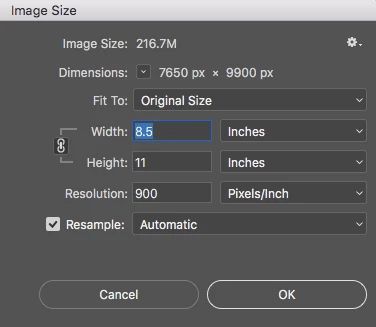
    If it were me, I'd scan 8.5 x 11 @ 900 ppi and as a psd or tiff if I want to use Photoshop and  add layers.  Lots of overhead and "future-proofing".

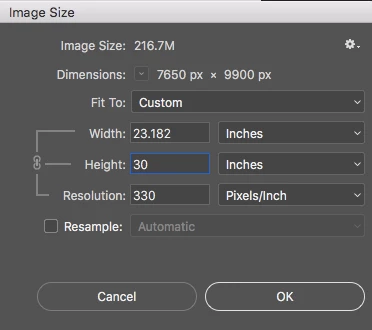
    Then if I want to print at 24 x 30, I have 330 ppi for a quality print if I uncheck resample so I don't rewrite the pixels.

    Notice I keep the same amount of pixels.

    So when you are at the copy shop, ask for that 900 resolution if your drawing is on a 8.5 x 11 sheet of paper.

    Again, it should be scanned as a psd or tiff, not a pdf if you plan to add layers. Importing a pdf is extra work, just read the psd directly and start adding layers and other edits.

    Then save a flattened copy as a PNG if that's what the printer needs for the final output. Keep the master copy.

    Gene

    3 replies

    D Fosse
    Community Expert
    Community Expert
    November 15, 2016

    In general terms, an image that works for a magazine spread, will most likely also work for a big poster, or for a wall-sized outdoor banner. It will fill the same angle in your total field of vision - or more simply put, the relative perceived size will be the same.

    davescm
    Community Expert
    Community Expert
    November 15, 2016

    You can work out the dpi that is resolvable by your eyes based on the viewing distance.

    If you take the normal viewing distance to be  approximately 1.5 x the diagonal so for your 24x36  it would be 43".

    The link below gives the formula to work out dpi  - but also shows a table which is easy to use for various print sizes (Your 24 x 36 example works out as 160dpi)

    Resolution for print viewing distance

    I hope that helps

    Dave

    gener7
    Community Expert
    Community Expert
    November 15, 2016

    Simple rule of thumb: 300 ppi is a good offset print resolution. But sit down with your printer or grab their FAQ on File specs.

    36 inches x 300 ppi = 10800 pixels

    24 inches x 300 ppi = 7200 px

    So your art must be either scanned or produced in those dimensions.

    Digital Imaging terms

    Pixel Dimensions W x H in Pixels 6000 x 4000 as an example for my camera

    Total Pixel Count: 6000 x 4000 = 24 Million or 24 Megapixels (24 MP)

    Resolution:  This is a Print term, as in how many pixels will in an inch on paper. Depending on the printing device, it can be 220-360 ppi.

    For my camera, at 300 ppi ideal 20 in x 13 in print size.

    jennifers116981
    Participant
    November 16, 2016

    So just to clarify and make sure I'm understanding EVERYONE here -

    If my image was an 8.5x11 scanned in at 300ppi and when I pulled the scanned PDF to photoshop I resized it to 24"x30" (36 kept stretching the image)  at 350ppi and am putting my color over it.  (It was a sketch)   This should be able to print at 24x36 with little to no resolution quality lost?

    The problems I have is that we don't have a scanner of our own (we're working on it) so I have to go to Staples or Copyworks.  I let them know I want it in at the best possible quality etc but I haven't worried too much about the original scan size because I am layering color over it and it won't even show up in the final product.  Am I taking the correct steps?  I can't really look at it because I am doing all my work on my laptop and surface pro (Working on getting a Cintiq too) so I don't really know how I can step back and look at it.

    I am new to ALL of this and essentially have to teach myself.  So I really appreciate all the feedback!

    gener7
    Community Expert
    Community Expert
    November 16, 2016

    jennifers116981 wrote:

    So just to clarify and make sure I'm understanding EVERYONE here -

    If my image was an 8.5x11 scanned in at 300ppi and when I pulled the scanned PDF to photoshop I resized it to 24"x30" (36 kept stretching the image) at 350ppi and am putting my color over it. (It was a sketch) This should be able to print at 24x36 with little to no resolution quality lost?

    Definitely a bad idea. Here is what's going on:

    If you do not scan or create an image at the size/resolution you intend to print it at, you either have to upsample or rescale.

    Upsampling redraws the image and interpolates (averages the old pixels to create new ones). Going from 11 inches to 30 inches is asking the software to guess and does not add the detail an original size scan does. Even when I upsample, 1.6x is the upper limit, and you have almost 3x.

    Rescaling is where you uncheck Resample in Photoshop's Image Size and tell it to increase the Print Size by cutting down the resolution.

    8.5 x 11 @ 300 ppi rescaled to 24 x 30 inches drops the resolution to 110 ppi, which is very low for print.

    Also notice the Aspect Ratio (W/H) is not the same for 24 X 30, so you get 23.1 not 24. Don't uncheck that chain link to get that size, you'll just stretch the image.

    So you definitely would get a large format scan (24 x 30 @ 300) from a Copy shop that has that has large format scanners.

    If your item can fit a 8.5 x 11 scanner, you could scan it at 1000 ppi, so you can rescale to a resolution in the  neighborhood of 300 ppi.

    Most scanners are Home/Office paper documents, so be sure it's for art/photo.

    So I hope this gives you a good idea what is needed.

    If you don't scan, but create your art from scratch, start your new document at 24 x 30 @ 300 or the suggested viewing resolution Davecm talks about.

    Gene