
Inspiring
November 27, 2016
Answered

Restore Aspect Ratio in Camera Raw

  • November 27, 2016
  • 1 reply
  • 1719 views

I shot some stills in video mode with my Canon T5i, and it recorded the images at a 16:9 ratio. I want the images to match the other images that I took in Manual mode (raw files, 3:2, 17.9 megapixels). I know that the data is there because I can see it in Preview on my Mac and was able to save a Tiff with the 3:2 ratio in iPhoto.

My question is how do I restore the stills I shot in video mode to 3:2 ratio to match my other photos?

I'm using camera raw in photoshop.

Thanks!
This topic has been closed for replies.
Correct answer Jeff Arola

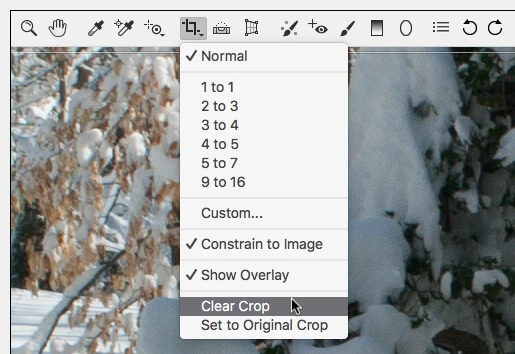
In the Camera Raw dialog click and hold on the Crop Tool icon and then click on Clear Crop.

1 reply

Jeff Arola
Community Expert
Jeff ArolaCommunity ExpertCorrect answer
Community Expert
November 27, 2016

In the Camera Raw dialog click and hold on the Crop Tool icon and then click on Clear Crop.

jozo10Author
Inspiring
November 27, 2016

you are a life saver!

jozo10Author
Inspiring
November 27, 2016

Do you by any chance, know how to straighten an image? I'm having trouble using the ruler in Camera Raw. I'm sure you can straighten also within photoshop using the crop tool.