
Known Participant
May 25, 2017
Answered

Retrieving Lost Photoshop File

  • May 25, 2017
  • 3 replies
  • 1483 views

I have a couple Photoshop files that are pretty big, so big that they force me to close a few programs. (I'm on a Mac.)

Photoshop is often stalled, so I have to force close it. The problem is that when I reopen Photoshop, I get a blank slate, whereas it used to reopen with the files I was working on when I force closed it.

Even worse, when I choose "Open Recent Files," I don't the files I was working on last listed. Nor have I been able to track down the file I was working on in my folders.

So my first question is this: If you force close Photoshop, can it delete files you're working on? Second, why does Photoshop no longer open with the files I was last working on?

Thanks.
    This topic has been closed for replies.
    Correct answer barbara_a7746676

    There was a problem with some recent files not showing, but that should have been fixed in one of the updates. Make sure you are using the most current version of Photoshop.

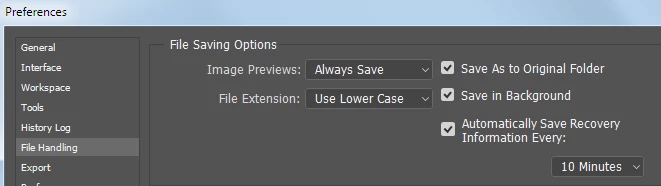
    In Preferences you can turn on 'Automatically Save Recovery Information' so that if Photoshop crashes you can recover work.

    3 replies

    D Fosse
    Community Expert
    Community Expert
    May 25, 2017

    I absolutely agree with that.

    Photoshop is often stalled, so I have to force close it. The problem is that when I reopen Photoshop

    It's the other way round - the latter is not the problem here; the former most certainly is.

    Nor have I been able to track down the file I was working on in my folders.

    The very expression "track down" sounds like a problem in itself here. If you don't know exactly where your files are, and have to rely on "recent files" to find them, you should really start organizing your work in a logical folder tree.

    The "fishtank" principle is fairly popular in the Lightroom crowd, but that only works because they have other reliable tools to organize, like keywords and collections. Even then it's advised to have a folder structure to fall back on.

    barbara_a7746676
    Community Expert
    barbara_a7746676Community ExpertCorrect answer
    Community Expert
    May 25, 2017

    There was a problem with some recent files not showing, but that should have been fixed in one of the updates. Make sure you are using the most current version of Photoshop.

    In Preferences you can turn on 'Automatically Save Recovery Information' so that if Photoshop crashes you can recover work.

    GeobopAuthor
    Known Participant
    May 25, 2017

    I just found my "missing" file. But I'm still interested in knowing why it didn't appear in "Open Recent Files" - and why all the tabs I had open are gone when I restart Photoshop.

    Legend
    May 25, 2017

    Recent files lists may be updated only on a normal close. Having to force close is a big disaster; sugges you focus on fixing this rather than accepting it as normal.