star098stone
Participating Frequently
October 21, 2019
Answered

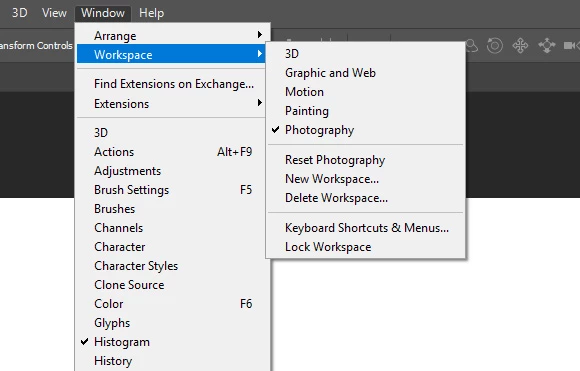
Return Essentials (Default) workspace

  • October 21, 2019
  • 2 replies
  • 18684 views

Hello! I accidentally deleted Essentials (Default) workspace, how can I get it back?

Thanks
    This topic has been closed for replies.
    Correct answer gener7

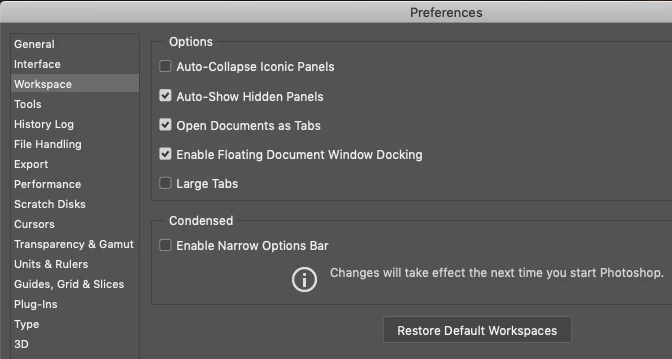
    There is an option to restore default workspaces under Preferences (Cmd or Ctrl k) See if that works.
     

    2 replies

    gener7
    Community Expert
    gener7Community ExpertCorrect answer
    Community Expert
    October 21, 2019

    There is an option to restore default workspaces under Preferences (Cmd or Ctrl k) See if that works.


    star098stone
    Participating Frequently
    October 21, 2019

    Thank you very much! That helped.

    Inspiring
    September 28, 2021

    It looks like this solution is no longer working.  Not only is there still no way to transfer workspaces but upgrades often break/reset workspaces and essentials classic is the closest to what I use. 


    I have lost hours reconfiguring workspaces due to this issue over the past 5-10 years.

    Omar.Fathy
    Community Expert
    Community Expert
    October 21, 2019

    Just reset your application preferences and it will come back without loosing any of your customized settings:
    To restore preferences quickly using a keyboard shortcut: Press and hold Alt+Control+Shift (Windows) or Option+Command+Shift (Mac OS) as you start Photoshop. You are prompted to delete the current settings. The new preferences files are created the next time you start Photoshop.