Participant
May 25, 2022
Answered

reverse path selection

  • May 25, 2022
  • 2 replies
  • 1060 views

Versión de Adobe Photoshop: 23.3.2 20220503.r.458 d8a9c44 arm64 Número de inicios: 65 Sist. op.: Mac OS 12.1.0


When I convert the path to a selection , the selection is inverted.
attached sample reference

thanks,

This topic has been closed for replies.
Correct answer Michael Bullo

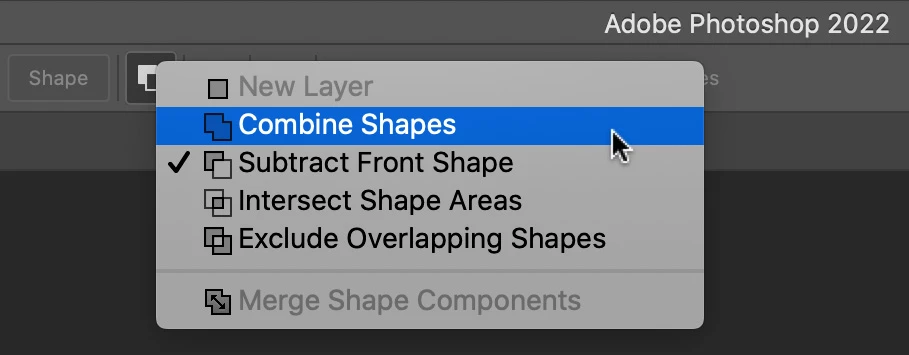
I'm guessing that whatever vector tool you are using to create your path is in Subtract mode. Look for the dropdown in the Options bar running along the top of Photoshop and change it to something like Combine. You can also change this property on an existing path as long as it is selected.
 

2 replies

Bojan Živković11378569
Community Expert
Community Expert
May 26, 2022

To invert selection press Ctrl + Shift + I. I believe that @Michael Bullo answer is correct regarding why you have "inverted" selection. Pay attention when drawing path, ensure that Combine Shapes (works good as starting point at least) is selected.

Trevor.Dennis
Community Expert
Community Expert
May 26, 2022

We'd have been able to answer that for sure if the OP suplied a full screen, full res screen shot of his/her workspace. 

Michael Bullo
Community Expert
Michael BulloCommunity ExpertCorrect answer
Community Expert
May 26, 2022

I'm guessing that whatever vector tool you are using to create your path is in Subtract mode. Look for the dropdown in the Options bar running along the top of Photoshop and change it to something like Combine. You can also change this property on an existing path as long as it is selected.


Participant
May 26, 2022

Thanks Michael !!!!

Michael Bullo
Community Expert
Community Expert
May 26, 2022

Thank you. Happy designing 🙂
