

Answered
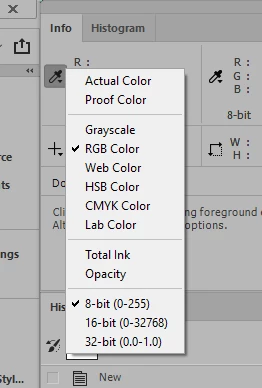
RGB values in Info Panel
When working with the Info panel, I get 5-digit values for RGB colors. For example, if I create a square, fill it with R=255, G=0, B=0, and pass my cursor over it, the color appears in the Info panel as 32768, 0, 0. I have no idea how to interpret that.
Also, I notice that in some files, my corresponding CMYK colors are represented as percentages; however, in some files, CMYK values are followed by an exclamation point. Again, I have no idea what that means.
Anyone?
 AdChoices