
Answered
Right to left text issue with illustrator & photoshop
Hi there, so since my programs auto-update, I can't pinpoint the version this
issue started for me but the RTL formatting isn't working.
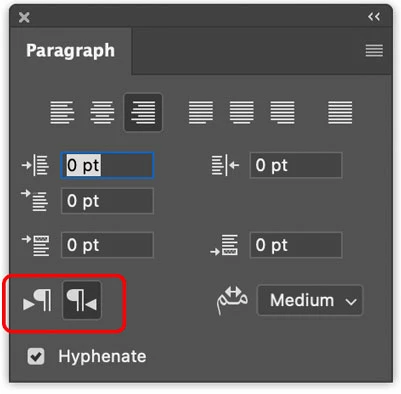
I do have my paragraph set to "Middle Eastern & South Asian Every-Line Composer"
and I can write in RTL. But all of the punctuation marks are on the other side, which I used
to be able to fix using the RTL button (the P icon with an arrow underneath) which no longer exists?
(i used to have a "middle eastern options" options under paragraph that poped these icons out)
The same thing happens in both illustrator and photoshop... I had to revert to an earlier version
of photoshop (21.2.7 - works fine)... Is this a new release issue or am I missing something?
 AdChoices