
Inspiring
June 29, 2022
Answered

Rounded corners question

  • June 29, 2022
  • 4 replies
  • 1752 views

When I create a square with rounded corners and I go to Properties I see these buttons at the bottom:
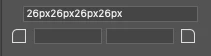
Whether I click and drag the one on the left

or the one on the right

I get the exact same results and it just changes the rounded corners of all 4 corners. Is there a different situation where those behave different?

Also, what are those rectangles in between the buttons? If I click them their border turns blue, but that doesn't seem to do anything. Also, I can't double click and type anything, which seemed to be intuitive when seeing those boxes.
Correct answer TiagoRocha

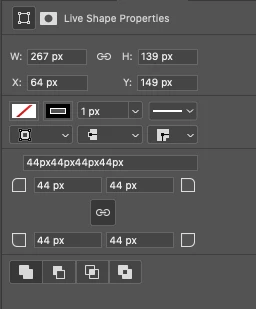
EDIT: the window was not tall enough so I couldn't see the link button along with the 2 bottom corners buttons. This is what I see now:

Now it all makes sense. My bad...

4 replies

TiagoRochaAuthorCorrect answer
Inspiring
June 29, 2022

EDIT: the window was not tall enough so I couldn't see the link button along with the 2 bottom corners buttons. This is what I see now:

Now it all makes sense. My bad...

davescm
Community Expert
Community Expert
June 29, 2022

Click on the link symbol to the left of the buttons and it will unlink them so you can change individual corners, or just hold Alt(Opt on Mac) when dragging the on-canvas controls


Dave

Inspiring
June 29, 2022

I don't see any link symbol next to these buttons:

Also, when I press ALT, I'm not able to change individual corners. The cursor changes to the cross with a minus next to it and when I click and drag (while still holding ALT) it just creates a new shape.


Jumpenjax
Community Expert
Community Expert
June 29, 2022

The yellow box on the actual box click on the yellow diamond and pull toward tone like until desires shape. If you would like to change each corner differently hold down shift option and click on the diamond until desired shape.

Lee- Graphic Designer, Print Specialist, Photographer
lambiloon
Community Expert
Community Expert
June 29, 2022

Hi, these help in making corners round by entering value or shape change.regards

Ali Sajjad / Graphic Design Trainer / Freelancer / Adobe Certified Professional
Inspiring
June 29, 2022

Not sure I understand what you mean...

This is what I see:

And yes, I understand that this is to make the corners round, but my question is: if those 2 buttons at the bottom do the exact same thing (they both change the radius for all 4 corners), what's the purpose of having 2? As you can see, the link button at the top is not even ticked (which shouldn't make any difference anyway, because that's related to the Width and Height).

Derek Cross
Community Expert
Community Expert
June 29, 2022

Shift plus drag (to change one corner) not sure the key for Windows.

The blue square is to anchor an image to text.

You can use the drop-down menu to get other kinds of corners as well.

Inspiring
June 29, 2022

Using SHIFT doesn't make any difference. I'm on a Mac as well. Once I do that, it just starts a new shape.


The blue border I was refering to is this (at the bottom):


I don't see that menu you have for the type of corners.